Migration guide · AI app builders
Migrating off Emergent once the app has real users
By Max Winter-Leinweber8 min read
In short
Migrating off Emergent is a move to new hosting, not a rebuild. Emergent writes a React frontend, a FastAPI backend and a MongoDB database, and the code goes to your own GitHub on a paid plan. What takes planning is outside the code: the production database comes out through Emergent support, AI features billed through the Universal Key need provider keys of your own, and the secrets the live app runs on may not match the .env file you can see.
- Code export
- GitHub, on paid plans
- Stack
- React, FastAPI and MongoDB
- Production data
- Exported by Emergent support
- Usual approach
- Same code, your own hosting
When is an app ready to leave Emergent?
When the app matters more than the speed of building it. Emergent is quick to start on because it hosts everything for you, and that becomes the problem once paying customers rely on the app.
Every change costs credits. Emergent's own docs say everything, from a chat prompt to a full build, uses them, and its plans page counts each deployed app at 50 credits a month on top.
Production runs on smaller machines than preview. Emergent warns that libraries which work in preview, such as pandas or Playwright, can time out or crash once deployed.
The database sits on a cluster shared with other Emergent users, and getting a copy of it means emailing support.
A developer joining wants branches, reviews and a staging copy of the app, rather than an agent that can't see the production database.
If the app is still a prototype you're showing to early users, none of this is urgent. Keep building in Emergent, push to GitHub at every milestone, and come back to this guide when the first customer pays.
An Emergent app is a stack any developer knows
Emergent builds web apps from a React frontend, a Python backend on FastAPI and a MongoDB database, with Expo and React Native for mobile apps. None of that is proprietary. A developer who has never heard of Emergent can open the repository and recognise every part.
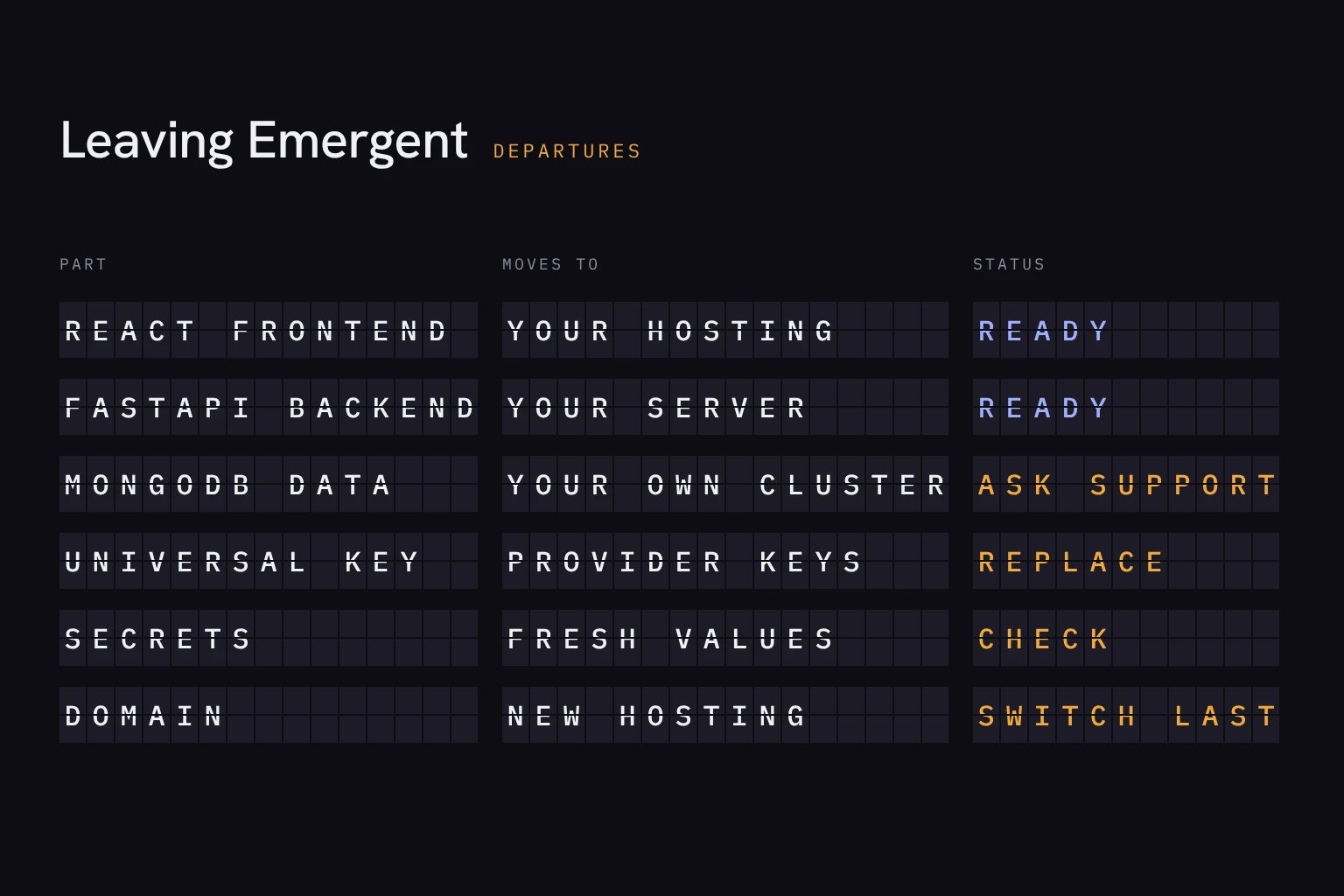
That puts Emergent at the easy end of AI builders to leave. Base44 hands you the interface and keeps the backend, so leaving there means writing one. From Emergent the backend comes with you, and the work is hosting it, moving the data and replacing the services Emergent supplied. Why leaving Base44 means rebuilding the backend
Get the code into a repository your company owns
Click Save to GitHub in the chat, choose or create a repository and push. The GitHub integration isn't on Emergent's free plan, so you need a paid plan for at least the month you leave. Push to a repository in your company's GitHub organisation rather than the personal account of whoever built the app.
Emergent can also pull from GitHub into a new task. That means the move doesn't have to freeze the product: keep making changes in Emergent if you need to, push them to a branch, and merge them into the repository the new hosting deploys from.
Next, get it running on a laptop. Install the packages in requirements.txt and package.json, then search the code for anything that assumes Emergent: the preview address ending in preview.emergentagent.com, a backend URL read from an environment variable Emergent filled in, and CORS settings written for Emergent's domains. Emergent supplies the database URL, backend URL, port and CORS settings automatically, so each one needs a value of your own.
Host the FastAPI backend somewhere that runs it as a long-lived service, with the database on its own managed service rather than the server's disk. Size the server for what the app does, and the heavy libraries Emergent's deployments couldn't run stop being a problem. Putting a Python web app online without losing data
The production database comes out through support
Email Emergent support for an export, and plan around a wait of up to 24 hours. Preview and production use completely separate databases, so the data in your workspace is test data. Your customers' records are only in production, which the agent can't see and which support copies out for you.
A day's turnaround is fine for a rehearsal and awkward for the real switch, because anything customers write while you wait would be lost. Two ways round it:
Freeze writes for the final export. Put the app into read-only mode before requesting the last export, and switch once it's imported. Simple, but customers can't change anything for up to a day.
Build an export into the app. Add an admin-only endpoint to the backend that writes each collection out as JSON. Deploy it to Emergent first, then the final export takes minutes and the read-only window shrinks to match.
Request the first export early and import it into a MongoDB cluster in your own account, choosing the region yourself. Compare document counts collection by collection, and check that uploaded files kept in the database came across. Choosing where your app's data lives, and why UK customers ask
Moving to Postgres at the same time is optional. MongoDB runs plenty of production apps, and switching databases mid-move adds a second migration to the first. Do it later if the data turns out to be relational, with orders, customers and invoices that all point at each other.
The live app may not be running on your .env file
Check every secret the production app uses rather than trusting the .env file in the workspace. Emergent's docs say that redeploying adds new keys to production but never updates existing ones. Change a Stripe key in .env after the first deploy, and the live app keeps the old value.
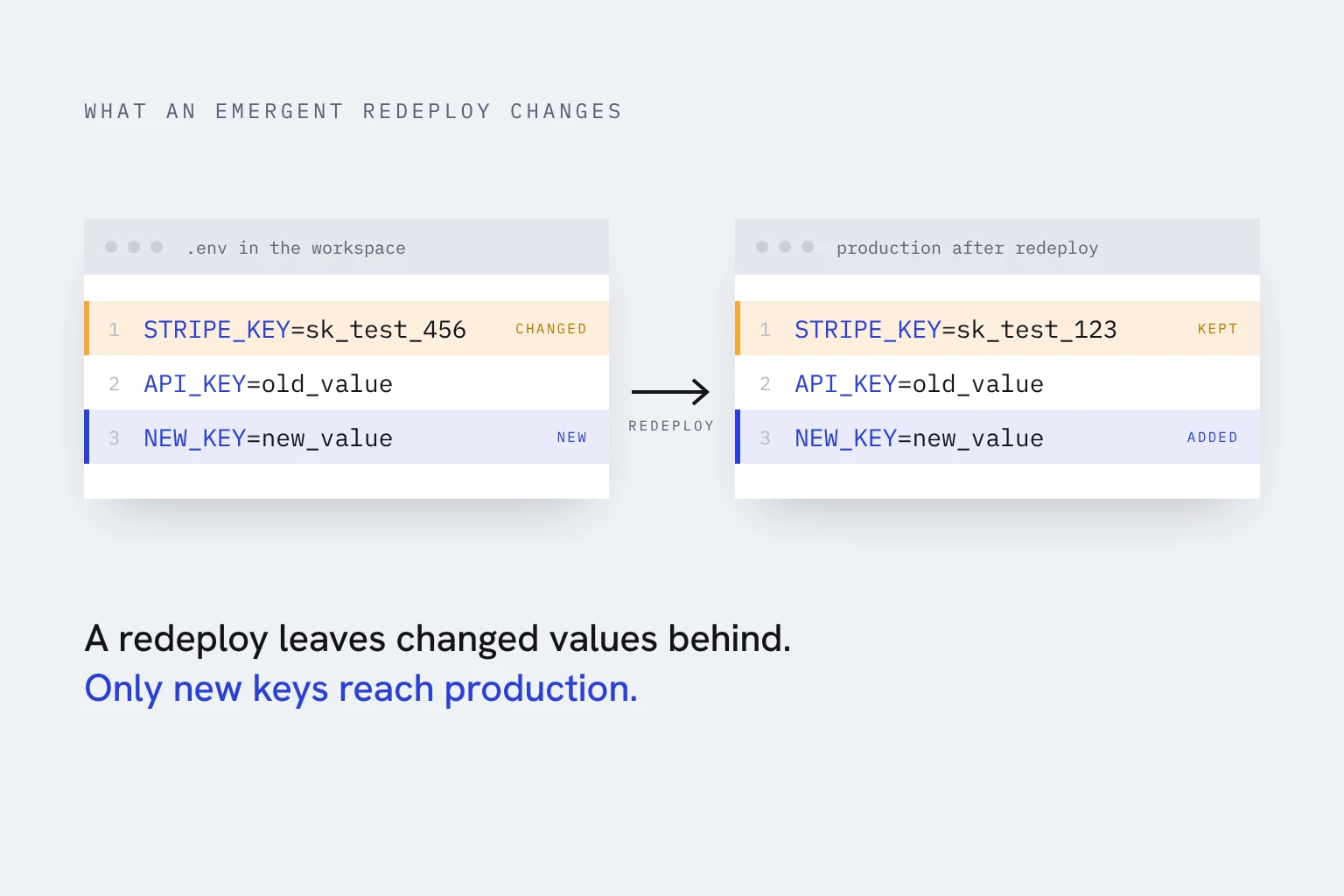
So list each key with the service that issued it and the value production really holds. Emergent's Stripe guide has you paste both Stripe keys into the agent chat, and any key that has sat in a chat log should be replaced with a new one when you move. The secrets section of our vibe-coded app audit covers where the rest should live. Where an AI-built app's secrets belong
Swap the Universal Key for provider keys of your own
AI features built with Emergent's Universal Key draw on your Emergent credits. That covers text from GPT, Claude and Gemini, image generation and reading images. Leave it in place and your AI bill stays tied to an Emergent account after everything else has moved.
Open accounts with the providers your app calls, in the company's name, and create keys there. Then find every place the backend calls a model and point it at the provider's own SDK. Set a spending limit with each provider before switching. Unless auto-recharge was on, the Emergent credit balance capped what the AI features could spend, and nothing caps it now. Test each AI feature against saved examples of good output, since the same prompt can answer differently once it goes straight to the provider. How to choose a model for an AI feature
Moving an Emergent mobile app
Emergent mobile apps are Expo projects with the same FastAPI and MongoDB backend, so the backend moves as above and the app follows. Expo's build service, EAS, builds and submits the app from an Expo account, and that account, the Apple developer account and the Google Play account should all be in your company's name.
If the app is already in the stores, release the moved version as an update to the same listing. Keep the bundle identifier and signing credentials it shipped with, and point the app at the new backend address. Users then get it like any other update, with no new install and no lost reviews. Our free App Launch Checklist builds a list of the store, legal and analytics steps for your app. Build your list with the App Launch Checklist
Migrating off Emergent, from first export to switch-off
Most web apps move in one to three weeks, and the data step sets the pace far more than the code. Run it in this order, with the Emergent deployment serving customers until the last step.
Code in your company's GitHub, running on a laptop.
A rehearsal export from support, imported into your own MongoDB cluster, with counts that match.
Hosting for the frontend and backend on a staging address, with your own keys and a fresh set of secrets.
AI features moved to your provider accounts and tested against saved examples.
The final export, during a write freeze or through your own export endpoint.
The domain pointed at the new hosting, with sign-in redirect URLs, Stripe webhooks and every other service that knew the Emergent address updated.
The Emergent deployment shut down once nobody has needed it for a couple of weeks, which ends its monthly credits.
We take Emergent apps through these steps for founders who'd rather not, usually within one of our fixed-price sprints. See what a fixed-price sprint includes
Frequently asked questions
- Will users need new passwords after migrating off Emergent?
- It depends on how sign-in was built. If accounts are stored in your own MongoDB with hashed passwords, they come across in the data export and keep working, as long as the new backend checks passwords the same way. At most, users sign in again. If the app uses an outside sign-in service, accounts stay with that service.
- Can I keep using Emergent's agent after moving the hosting?
- Yes. Pull the repository into a new Emergent task, make changes and push them to a branch, then deploy from your own pipeline. Review what comes back before merging, because the agent may reintroduce Emergent settings such as the Universal Key or preview addresses.
- What if my Emergent app already uses Supabase?
- Then the data, and possibly sign-in, already live in a Supabase project rather than in Emergent's MongoDB, so there is no database export to request. Check the project belongs to your company's Supabase account rather than whoever connected it, then move the code and keys as above.