Migration guide · AI app builders
UK data residency for Lovable, Replit and Base44 apps
By Max Winter-Leinweber9 min read
In short
UK data residency is a choice rather than a legal requirement: UK GDPR lets an app store personal data abroad, as long as each transfer out of the UK is covered. Lovable Cloud and Replit let you pick a European region once and then lock it, Base44 keeps app data in the US unless your plan includes UK or EU residency, and a Supabase project you create yourself can sit in London.
- Required by UK GDPR
- No, but transfers need cover
- Lovable Cloud
- Europe region, locked at set-up
- Replit
- EU region on paid plans, locked at publish
- Base44 default
- United States
- A London option
- Your own Supabase project, eu-west-2
Does UK GDPR require UK data residency?
No. Data residency is the country where your app's data is physically stored, and UK GDPR allows that to be outside the UK. What it regulates is the transfer: once personal data leaves the UK, a recognised rule has to cover it, and the country decides which rule applies and how much paperwork comes with it.
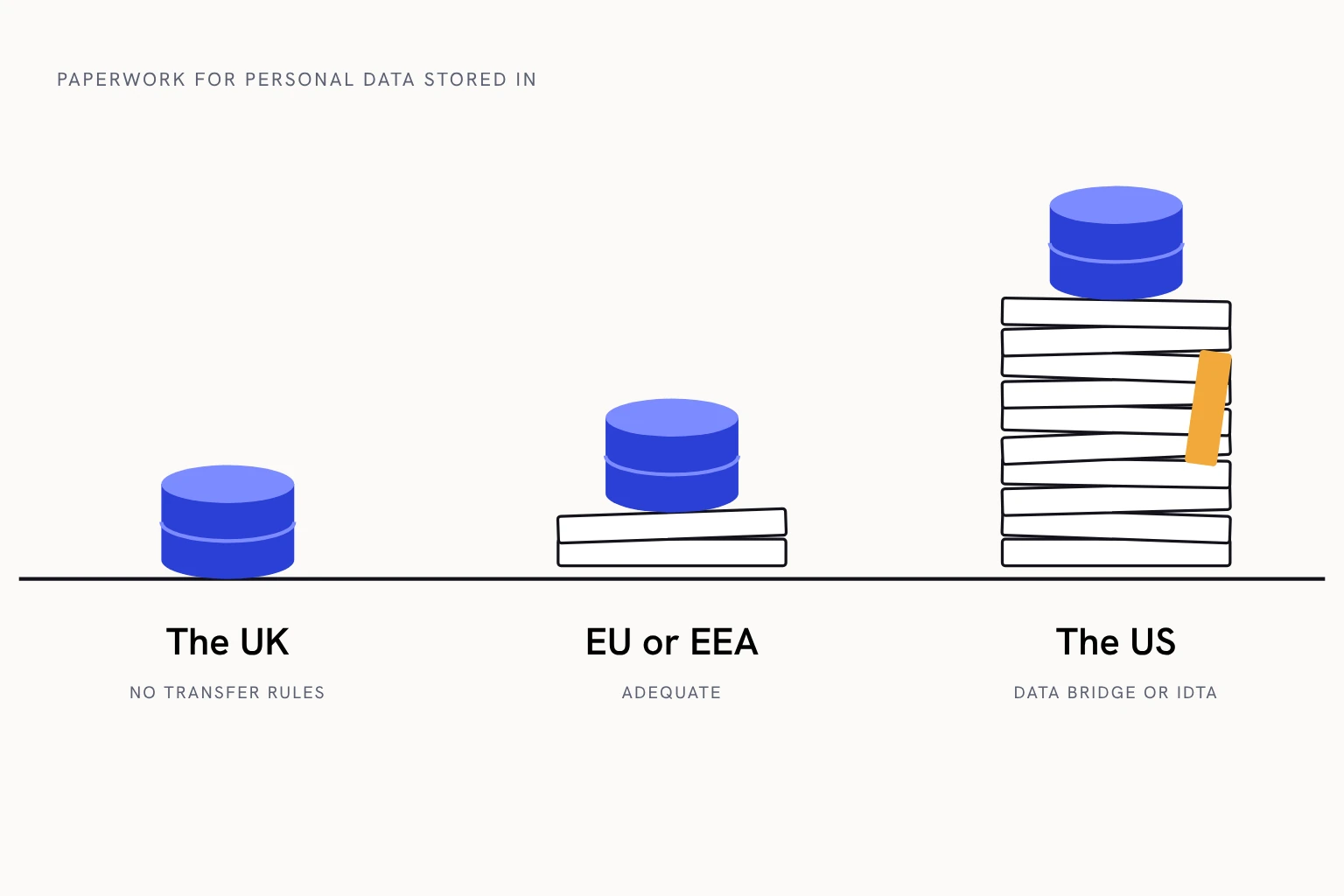
The European Economic Area is the easy case. The UK treats EEA countries as giving adequate protection, so a database in Frankfurt, Dublin or Paris needs nothing extra for your UK users. It works in the other direction too. In December 2025 the European Commission renewed its decision that the UK's protection is adequate, to run until December 2031, so data from customers in the EU can sit in London.
The United States takes more care. The UK-US data bridge covers a transfer only when the company receiving the data is certified under the EU-US Data Privacy Framework with its UK extension, so check each vendor's certification rather than assuming it. Without that, the transfer needs the UK's International Data Transfer Agreement or the UK addendum to the EU's standard contractual clauses, plus a risk assessment. Since the Data (Use and Access) Act 2025, that assessment asks whether protection in the other country is not materially lower than in the UK. Large hosting providers build these terms into their data processing agreements, which is why US hosting is lawful for most UK apps.
In practice, a customer raises the question long before a regulator does. Larger companies, schools, councils and NHS suppliers send a security questionnaire before they sign, where the hosting location is a standard question, and some will only accept UK or EU hosting. Your privacy policy has to say where data goes as well, so you need the answer whatever the law allows.
Where Lovable, Replit, Base44 and v0 keep your data
Each builder fixes the region when the backend is created or the app is first published, and most won't change it afterwards. That makes the region a decision for the first day of a project, before any real customer data goes in.
| Builder | Default region | UK or EU option | Can it change later? |
|---|---|---|---|
| Lovable Cloud | The region closest to you, or the workspace default on Business and Enterprise plans | Europe, chosen when you enable Cloud. There's no UK-only choice | No. The region locks once the backend is enabled |
| Lovable with your own Supabase | Wherever you created the Supabase project | Any Supabase region, including London (eu-west-2) | No. You create a new project and migrate |
| Replit | North America, and always on the free plan | Europe (EU), picked when you publish on Core, Pro and Enterprise plans | No. Replit calls the publishing region permanent |
| Base44 | United States | UK or EU residency on its higher plans | Yes. Base44 says existing apps can be moved to another region |
| v0 apps on Vercel | Functions in Washington, D.C. (iad1), and the database wherever its provider created it | Set the function region to London (lhr1) in the project settings | Functions yes, at any time. The database no |
A UK founder can get two of these wrong without noticing. Lovable Cloud offers Europe as a region but not the UK on its own, so if a customer insists on UK hosting, connect the app to a Supabase project you create in eu-west-2 instead. And Supabase's general Europe option can place a project in London or Zurich, neither of which is in the EU, so pick a specific region when a contract says EU only. Region is one row in a longer choice of backend, which our Supabase and Firebase comparison works through for a startup. Supabase vs Firebase for a startup.
Replit keeps the development workspace apart from the published app. The workspace has a region of its own, fixed when it's created, and Replit's documentation warns that development resources such as object storage may not match the published geography. Customer data copied into the workspace for testing sits with those development resources, so the workspace region belongs in your answer too.
Bolt is missing from the table because we couldn't find a region stated in its documentation. Ask Bolt in writing before launch, or claim the database into your own Supabase organisation, where the dashboard shows the region.
What the region setting leaves out
The region setting governs the database, and usually its backups and sign-in accounts. Every other service your app sends personal data to has a location of its own. Server functions are the easiest to miss, because they sit between the visitor and the database and handle every request.
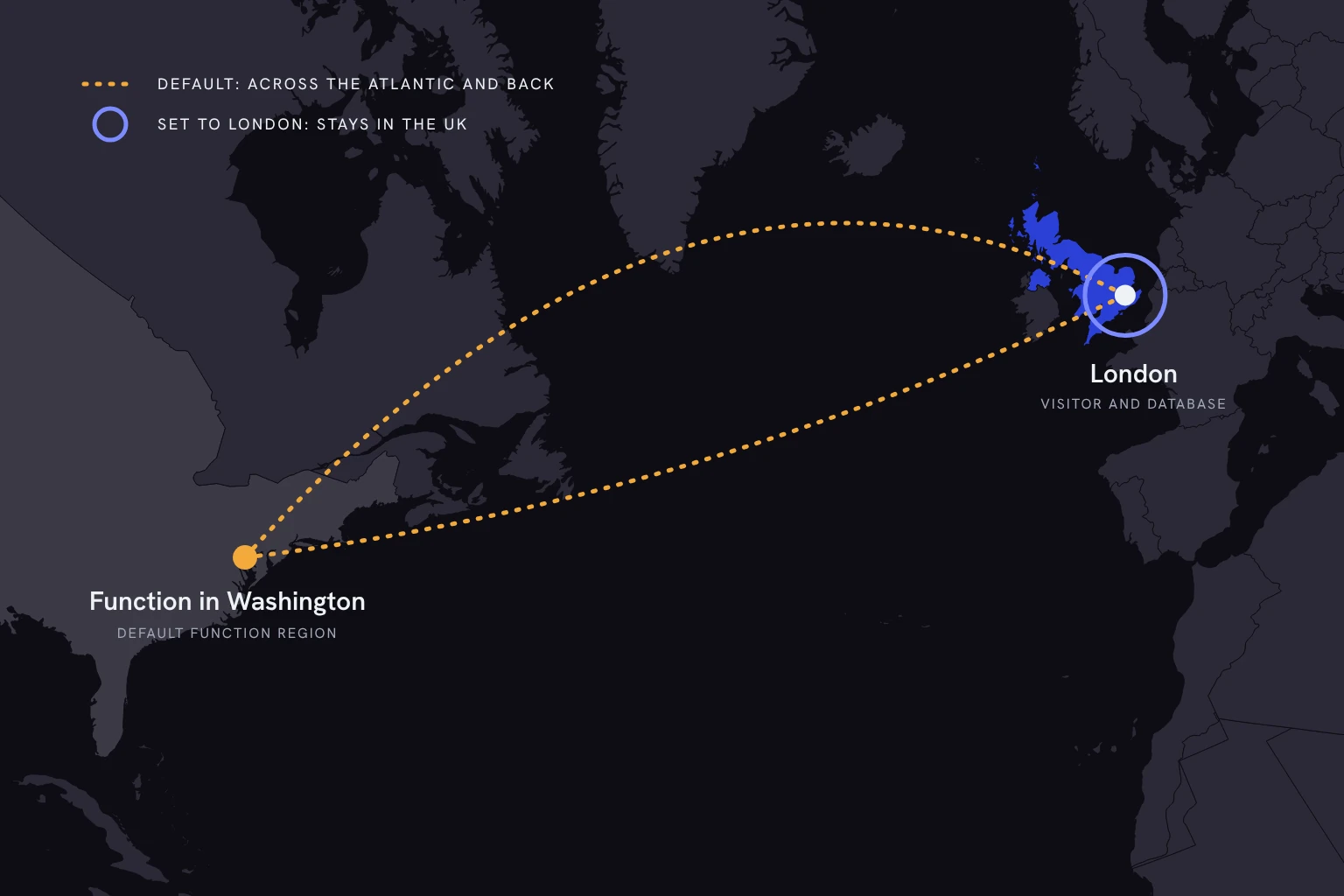
Server functions. Vercel runs functions in Washington, D.C. unless you change the setting, so a database in London still sends each request's data through the US. Put the functions in the same region as the database, which also cuts the delay on every page that reads data.
AI features in your app. A prompt containing a customer's details is processed wherever the model provider runs it, which is often the US, whatever region the database is in.
Processing on the builder's own servers. Base44 says its residency setting controls where data is stored, not where it's processed, so a request can pass through its services in another region before the result is saved.
Uploaded files. Base44's residency covers app data, users and backups. Its documentation says public files stay in the US, and that with UK residency, private files uploaded from 12 October 2026 are currently stored in the EU.
Email, payments, analytics and error tracking. Each one keeps at least an email or an IP address, in its own region, under its own data processing agreement.
How to check where your app's data is today
Look up the region in each dashboard, then write every answer into one table. Most builders show the region in a single place:
Lovable Cloud: open More, then Database, select Manage and then Settings. The region is listed as the Database location.
Replit: check the geography chosen when the app was published. If nobody chose one, or the project is on the free plan, it's North America.
Base44: check the workspace's data residency setting, then when each app was created. Base44 says apps created before 16 April 2026 stayed in the US, so check older apps one by one.
Supabase: the project's region is shown in its settings in the Supabase dashboard.
Vercel: open the project's settings, then Functions, and read the function region.
Everything else: the region and transfer terms are in each provider's data processing agreement or security page.
Give the table four columns: the service, the personal data it holds, its region and the rule that covers any transfer out of the UK. That one table is what your privacy policy is written from, and it answers most of a customer's security questionnaire in one go. Our free App Launch Checklist asks five questions about your app and lists the legal, payments, SEO, analytics and app store steps its launch needs, so the privacy work sits on the same list as everything else. Get your launch steps from the App Launch Checklist.
Our production audit for AI-built apps starts with exactly that check, along with secret keys and payments. The seven-area audit for a vibe-coded app.
Moving an app to a UK or EU region
You build a new backend in the right region and move the data into it, because Lovable Cloud, Replit and Supabase won't move a locked region for you. Base44 is the exception on plans that include residency. Treat it as a small migration, with a rehearsal and a quiet hour for the switch.
New project created in the region you need, such as a Supabase project in London
Database roles, schema and data restored, then every storage bucket copied
Project URL and API keys updated wherever the app reads them
Sign-in redirect URLs updated with Google or any other login provider
Function regions and other services moved to match
Switched over in a quiet hour, then signed in as an existing user and compared totals
Old project and its backups deleted once the new one is confirmed
Privacy policy updated to name the new location
The export and restore are the same steps a backup drill uses, with a new region as the target. Export and restore steps in our Lovable backup guide.
Lovable Cloud
The move is to your own Supabase project, since Cloud can't change region and has no automatic migration. It's also the right moment to put the Supabase, GitHub and hosting accounts in the company's name. Our guide to taking a Lovable app to production.
Replit
A published project can't change geography, so the EU version is a project published to Europe with the data moved across, or a move to a host where you choose the region. Our Replit guide covers that move week by week, storage and sign-in included. Getting a Replit Agent app ready for production.
Base44
Check whether your plan includes residency before planning any rebuild, because then the move happens in Base44's settings. If it doesn't, or the customer needs processing and every file in the UK as well, the backend has to leave Base44. What moving a Base44 app to your own backend involves.
When we move an app off an AI or no-code builder, the region is agreed before the new project is created, so the data only moves once. Our migration service for AI and no-code apps.
Frequently asked questions
- Is Supabase GDPR compliant?
- Supabase offers a data processing agreement and lets you choose the region, which covers its side. Whether your app complies depends on how you build it: who can read which rows, how long you keep personal data and whether you can delete a user's data when they ask.
- Do I need a data processing agreement with my app builder?
- Yes, if it stores or handles personal data for you. UK GDPR requires a written contract with every processor, and builders and hosting providers publish standard ones to accept online or on request. Keep a copy with your data map.
- What should a privacy policy say about where data is stored?
- Name the countries or regions where personal data is stored or processed, the kinds of service involved, such as hosting, email and payments, and the safeguard for anything outside the UK, such as the UK-US data bridge. If you promise UK or EU hosting, every service in your data map has to keep that promise.