Comparison
How to build a web app with Python
By Max Winter-Leinweber10 min read
In short
Flask is the simplest way to build a small web app with Python, Django suits one that needs accounts and an admin, and FastAPI fits one that mostly serves an API. Start with SQLite, run it with Gunicorn rather than the development server, and keep the database on a disk that survives a deploy. Below is a complete waitlist app in one Flask file, tested, that you can copy and run.
- Worked example
- A launch waitlist
- Code
- One Flask file, under 100 lines
- Frameworks compared
- Flask, Django and FastAPI
- Database
- SQLite to start, Postgres to grow
Which Python framework should you use?
Flask if the app is a handful of pages and forms, Django if it needs user accounts, roles and lots of related tables, and FastAPI if Python's job is to answer requests from a React or mobile front end. All three are open source and well established, so pick on the shape of your app rather than on speed or popularity.
| Framework | What comes with it | Pick it when | What you add yourself |
|---|---|---|---|
| Flask | Routing, Jinja templates and a development server | The app is a few pages and forms, and you want to see every moving part | A database layer, sign-in and an admin, from extensions or your own code |
| Django | Routing, templates, a database layer with migrations, user accounts and an admin site | The app has accounts, roles and many related tables from the start | Very little at first. In return, you work the way Django expects |
| FastAPI | Routing, request checking with Pydantic and interactive API documentation | A separate front end needs an API, or requests wait on slow calls such as an AI model | HTML pages, sign-in and a database layer |
There's a fourth option for one kind of app. If what you want is a chart over your own data for your own team, Streamlit turns a Python script into an interactive page with very little code. It isn't built for public sign-ups, where each person sees only their own records.
If you're not a developer and Python was a suggestion from someone else, check first whether you need code at all. Our free Build or No-Code Quiz asks seven questions to find out whether no-code will do for your idea or it needs real code. Take the Build or No-Code Quiz.
The example: a waitlist for your launch
The app collects email addresses from people who want to hear when you launch, and gives you a password-protected list of them with a CSV download. Nearly every founder needs one before launch, and despite its size it does what bigger apps do: it takes input from strangers, checks it, saves it, keeps part of itself private and lets you get your data out.
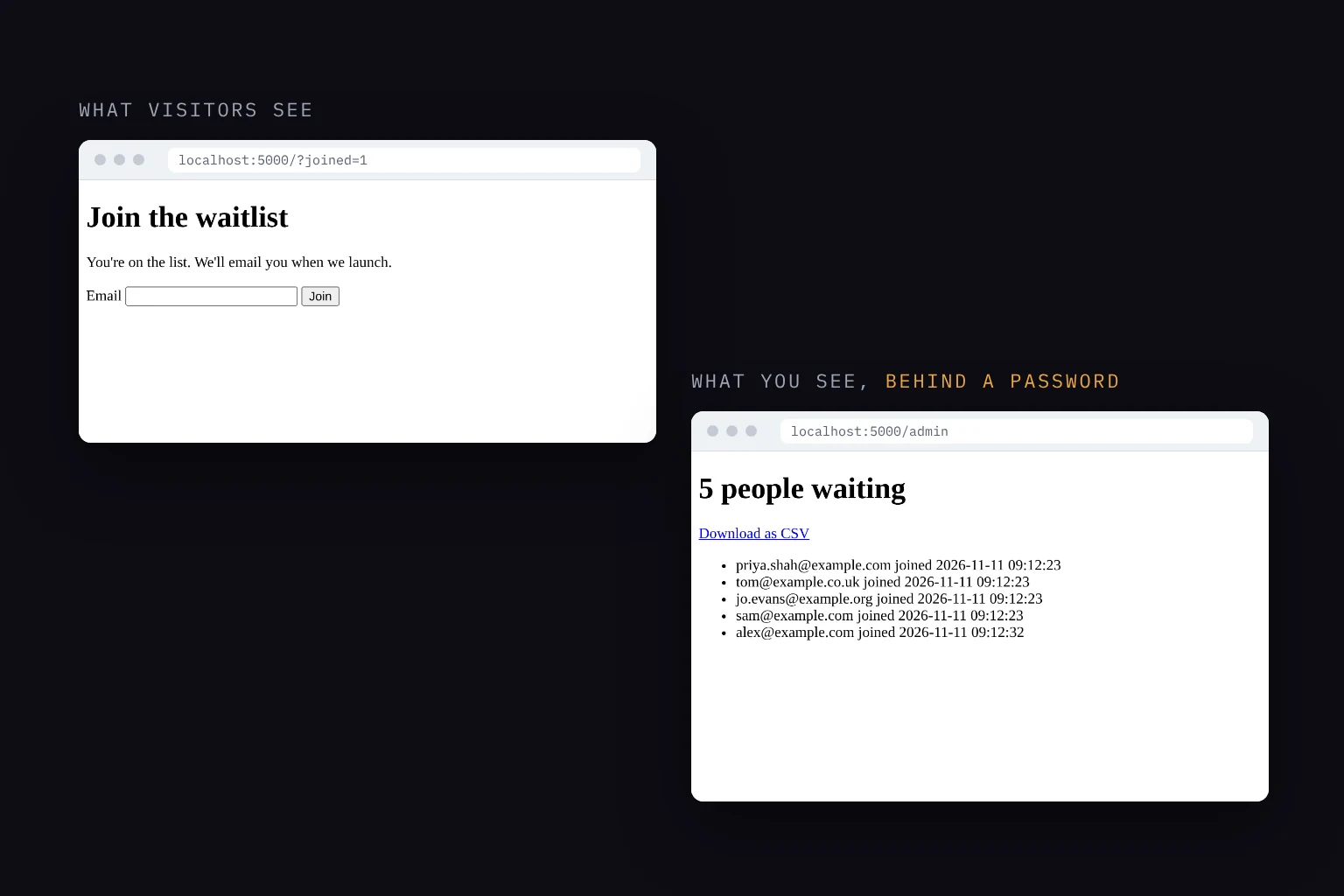
We use Flask here because the whole app fits on one screen, and nothing happens that you can't see in the code. The pages are left unstyled to keep the example short. Choosing one job for the first version, and writing down its rules before any code, is the part our guide to building a web app spends longest on. How to plan a web app around one useful job.
Set up the project
You need Python 3.10 or newer, the oldest version the current release of Gunicorn supports. Make a folder, create a virtual environment inside it so the app's packages stay separate from everything else on your machine, and install Flask and Gunicorn:
mkdir waitlist && cd waitlist
python3 -m venv .venv
source .venv/bin/activate
pip install flask gunicorn
On Windows, activate the environment with .venv\Scripts\activate instead. Run pip freeze > requirements.txt once it's installed: hosting platforms read that file to install the same versions when you deploy.
Build a web app with Python in one file
Save this as app.py in the folder. The HTML sits in two strings at the top so you can read the app from top to bottom. Once you have more than a couple of pages, move them into a templates folder and swap render_template_string for render_template.
import csv
import io
import os
import re
import secrets
import sqlite3

from flask import Flask, Response, g, redirect, render_template_string, request, url_for

app = Flask(__name__)
DATABASE = os.environ.get("DATABASE", "waitlist.db")
ADMIN_PASSWORD = os.environ["ADMIN_PASSWORD"]
EMAIL = re.compile(r"[a-z0-9][a-z0-9._%+-]*@[a-z0-9.-]+\.[a-z]{2,}")

SIGNUP_PAGE = """<!doctype html>
<title>Join the waitlist</title>
<h1>Join the waitlist</h1>
{% if message %}<p>{{ message }}</p>{% endif %}
<form method="post">
  <label>Email <input name="email" type="email" required></label>
  <button>Join</button>
</form>"""

ADMIN_PAGE = """<!doctype html>
<title>Waitlist</title>
<h1>{{ rows|length }} people waiting</h1>
<p><a href="{{ url_for('export') }}">Download as CSV</a></p>
<ul>{% for row in rows %}<li>{{ row.email }} joined {{ row.joined }}</li>{% endfor %}</ul>"""


def get_db():
    if "db" not in g:
        g.db = sqlite3.connect(DATABASE)
        g.db.row_factory = sqlite3.Row
        g.db.execute(
            "CREATE TABLE IF NOT EXISTS signups ("
            "email TEXT PRIMARY KEY, joined TEXT DEFAULT CURRENT_TIMESTAMP)"
        )
    return g.db


@app.teardown_appcontext
def close_db(error):
    db = g.pop("db", None)
    if db is not None:
        db.close()


@app.route("/", methods=["GET", "POST"])
def join():
    message = None
    if request.method == "POST":
        email = request.form.get("email", "").strip().lower()
        if EMAIL.fullmatch(email):
            db = get_db()
            with db:
                db.execute("INSERT OR IGNORE INTO signups (email) VALUES (?)", (email,))
            return redirect(url_for("join", joined=1))
        message = "That doesn't look like an email address."
    elif request.args.get("joined"):
        message = "You're on the list. We'll email you when we launch."
    return render_template_string(SIGNUP_PAGE, message=message)


def is_admin():
    auth = request.authorization
    given = (auth.password or "") if auth else ""
    return secrets.compare_digest(given.encode(), ADMIN_PASSWORD.encode())


def ask_for_password():
    return Response("Password needed", 401, {"WWW-Authenticate": 'Basic realm="Waitlist"'})


@app.route("/admin")
def admin():
    if not is_admin():
        return ask_for_password()
    rows = get_db().execute("SELECT email, joined FROM signups ORDER BY joined").fetchall()
    return render_template_string(ADMIN_PAGE, rows=rows)


@app.route("/admin/waitlist.csv")
def export():
    if not is_admin():
        return ask_for_password()
    rows = get_db().execute("SELECT email, joined FROM signups ORDER BY joined")
    out = io.StringIO()
    writer = csv.writer(out)
    writer.writerow(["email", "joined"])
    writer.writerows(rows)
    return Response(
        out.getvalue(),
        mimetype="text/csv",
        headers={"Content-Disposition": "attachment; filename=waitlist.csv"},
    )
Saving each sign-up once
SQLite comes with Python, so there is no database server to install, and the first request creates the table. Making the email address the primary key means the database itself refuses a second copy. INSERT OR IGNORE then quietly drops the repeat, so a double click or a second visit leaves one row. The person sees the same thank-you message either way, which also stops anyone using the form to find out who has already signed up.
Checking what strangers send
Anyone can post anything to a public form, whatever the HTML says, so the server does its own checking. The address is trimmed and lowercased, then matched against a deliberately strict pattern. The question marks in the SQL pass the email to SQLite as data, never as part of the command, which is what stops SQL injection. Jinja escapes everything it puts into a page, so text that looks like HTML is shown, not run.
The pattern also refuses addresses that start with =, + or -. Excel and Google Sheets treat a cell starting with one of those as a formula, and a waitlist CSV is going to be opened in one of them. After a successful sign-up the app redirects to a plain page rather than showing the message straight away, so refreshing doesn't post the form again.
Keeping the list private
The admin page and the CSV use HTTP Basic authentication, the browser's built-in password prompt, with the password read from an environment variable. If ADMIN_PASSWORD isn't set, the app won't start, which beats starting with an admin page anyone can open. secrets.compare_digest compares the passwords in a way that doesn't leak how many characters matched. Basic authentication sends the password with every request, so the live app must only be reached over HTTPS, which the hosts below provide.
Run it, then try to break it
Set a password and start Flask's development server with debug mode on, so it reloads when you save a change:
export ADMIN_PASSWORD=change-me
flask --app app run --debug
In Windows PowerShell, set the password with $env:ADMIN_PASSWORD="change-me". Open http://127.0.0.1:5000, sign up, then work through these before you trust it with real addresses:
| Try this | What should happen |
|---|---|
| Sign up as Priya.Shah@Example.com, then as priya.shah@example.com | One row on the admin page, and the same thank-you message both times |
| Sign up as =1+1@example.com | The form says it doesn't look like an email address |
| Open /admin in a private window | A password prompt, with nothing behind it until the password is right |
| Refresh the page straight after signing up | No second sign-up and no warning about resending the form |
| Start the app without setting ADMIN_PASSWORD | It stops with a KeyError instead of running with an open admin page |
Putting a Python web app online
Run it with Gunicorn on a host that deploys Python apps from your repository, such as Render or Railway. Flask's own server prints a warning every time it starts, because it's made for one person on one machine. Gunicorn handles several requests at once and restarts workers that crash. Give the host this start command, where PORT is the port the host tells your app to listen on:
gunicorn --bind 0.0.0.0:$PORT app:appGunicorn doesn't run on Windows, which only matters on your own machine, since the host runs Linux. PythonAnywhere works differently: you point its own server at the app object in a WSGI file and skip Gunicorn. Wherever it runs, set ADMIN_PASSWORD in the host's dashboard as a secret, and keep it out of the code and the repository.
Keep the database where a deploy can't wipe it
On Render, Railway and Fly.io, files written to the server's own disk are lost when you deploy again or the server restarts. That includes waitlist.db, and everyone on it. PythonAnywhere keeps your files, which is one reason it suits a small app like this.
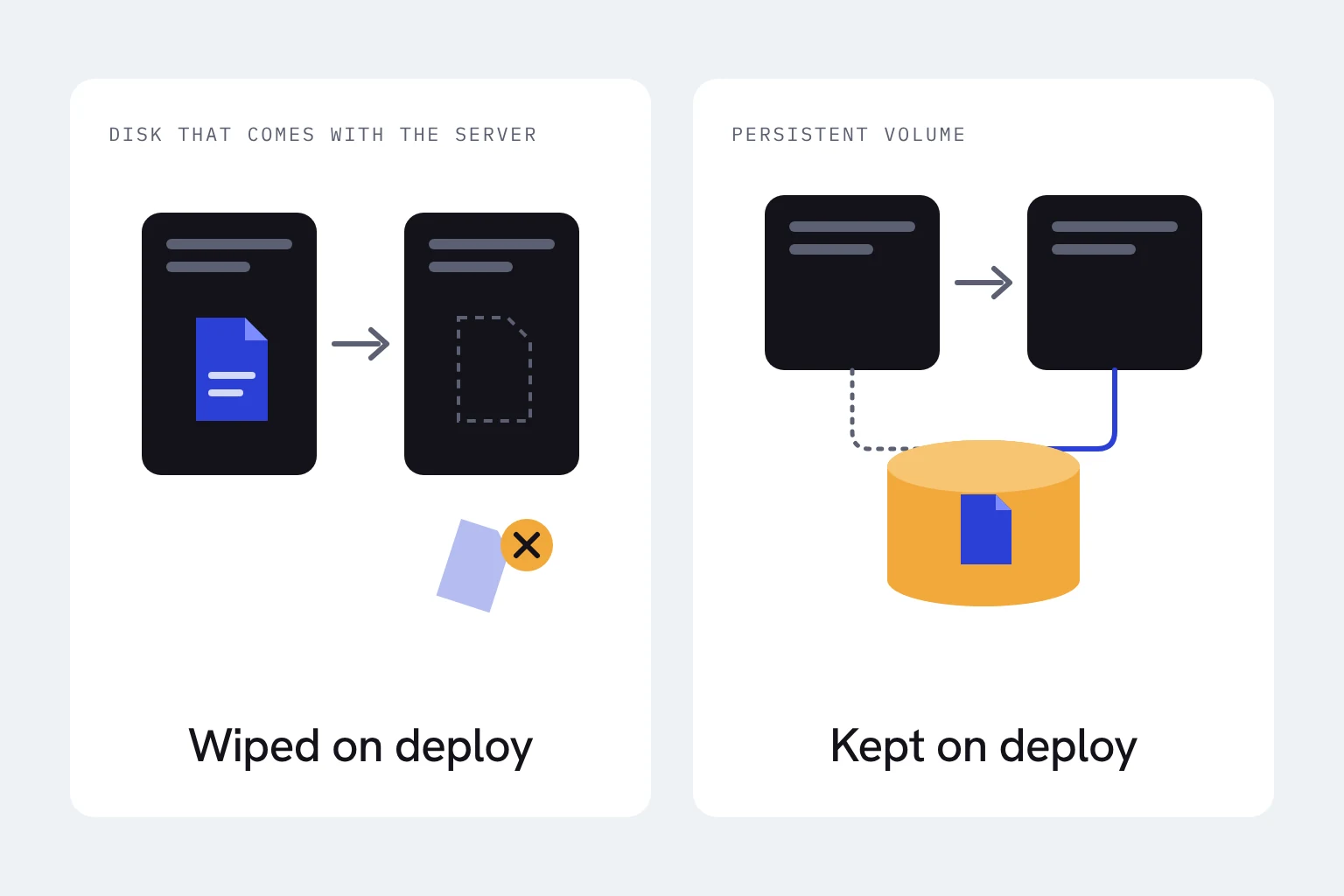
There are two fixes. Attach a persistent disk or volume and point the DATABASE variable at a file on it, which is why the app reads its path from the environment. A volume ties the app to one server, which is fine for a waitlist. Or move to a managed Postgres database, which you'll want anyway once you run more than one server or the app holds more than a list of emails.
The move to Postgres touches only a few lines here: the psycopg driver takes the place of sqlite3, the placeholders become %s and INSERT OR IGNORE becomes INSERT ... ON CONFLICT DO NOTHING. Supabase and Neon both host Postgres for you, and our comparison of Supabase with Firebase covers what else Supabase brings. How Supabase compares with Firebase as a hosted backend.
When the waitlist turns into the product
Accounts usually come next, then payments, then emails sent by the app, and each one is where a small Flask app starts asking for decisions. Flask leaves sign-in, database migrations and an admin to extensions you choose and wire together. Django includes all three: rebuilt in Django, this waitlist is a model with an email field plus one line registering it with the admin site, and the private list comes with it. FastAPI fits when a separate front end needs the data, returning the sign-ups as JSON and documenting the endpoint at /docs.
Decide which features the next version needs before choosing between them. Our free MVP Scope Planner lets you list the features you want, size each one and see what fits a first release and what can wait. Size your next release with the MVP Scope Planner.
We build production web apps in TypeScript, Next.js and Postgres rather than Python. If you've proved an idea with a Python prototype and want it rebuilt for real customers, the prototype is the best brief you can give anyone: it shows exactly what the app has to do. How we build custom web apps.
A prototype that already does one job is a good starting point for a fixed-price build. Our fixed-price packages and what they cover.
Frequently asked questions
- Do I need JavaScript to build a web app with Python?
- Not for an app like this one, where the server builds each page and the browser shows it. You need JavaScript once part of a page should change without a reload, such as a live search. The htmx library adds much of that through HTML attributes. A full React front end calling a FastAPI back end is the step after that.
- Can Python run in the browser instead of JavaScript?
- Yes, through Pyodide or PyScript, which run Python compiled to WebAssembly inside the page. They suit teaching, notebooks and data tools that work in the browser. The page has to download a Python runtime before it can do anything, so for an ordinary web app keep Python on the server and leave the browser to HTML and JavaScript.
- What's the best way to learn web development with Python?
- Build one small app all the way to a live address, then change it one step at a time: add a field, move the HTML into templates, swap SQLite for Postgres. Flask's official tutorial builds a small blog with sign-in, and Django's builds a polls app with its admin. Both make more sense once you've shipped something of your own.