Migration guide · Internal tool builders
Access database to web app migration, starting with the tables
By Max Winter-LeinweberUpdated 8 min read
In short
An Access database to web app migration goes best back end first. Migrate the tables to PostgreSQL and relink them, and the Access forms keep working while the web app is built on the same data. Then rebuild forms, reports, queries and VBA one area of the business at a time, and retire Access when the last one moves. A database of a few dozen tables typically takes six to ten weeks.
- Code export
- None, forms, reports and VBA are rebuilt
- Data
- Tables move to Postgres, Access relinks over ODBC
- Hardest part
- Rules hidden in VBA and form events
- Typical timeline
- 6 to 10 weeks
When should an Access database become a web app?
When people who can't sit at a Windows PC on the office network need it. Access runs only on Windows, and Microsoft retired Access web apps in 2018, so there's no official way to open an Access database in a browser. Everyone who uses it needs Access or the free Access Runtime installed, plus a path to the shared drive where the data file lives.
The file is nearing 2 GB. That's the limit for a whole .accdb file, data and objects together. Spreading tables across several linked files buys time, but only for a while.
The back end keeps corrupting. In a split database every PC writes straight to one file on a shared drive, and a VPN or Wi-Fi connection dropping halfway through a write is the classic way that file gets damaged. Compact and Repair becomes a weekly job.
Different people should see different records. The .accdb format has no user-level security, which Microsoft dropped in Access 2007, so anyone who can open the file can open every table in it, whatever the forms show them.
The person who built it is leaving. Plenty of Access databases hold years of VBA written by one person in finance or operations, with no tests and nothing written down.
If a handful of staff use it on office PCs and it isn't failing, keep it. Access is still included in Microsoft 365 business plans such as Business Standard, and a working system that nobody outside the building needs costs very little to run.
What's inside an Access file, and where each part goes
Tables and relationships move almost unchanged. Queries are translated into Postgres SQL, while forms, reports, macros and VBA are rebuilt, because each holds business rules in a different place. Start an inventory with the Database Documenter on the Database Tools tab, which prints every table, field, query and relationship, then export each VBA module as a text file so the code can be searched.
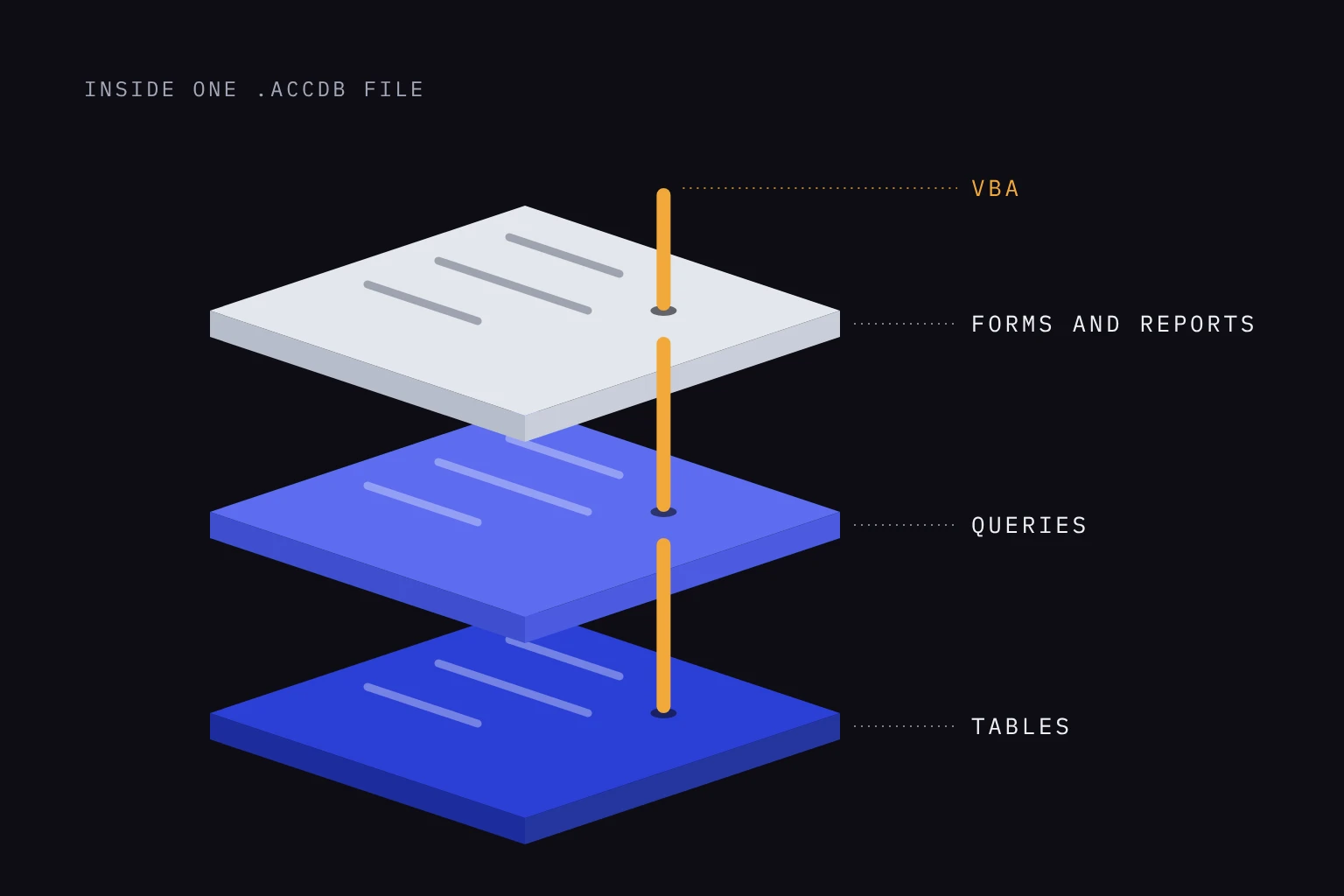
Tables and relationships. Become Postgres tables with foreign keys. Relationships that enforce referential integrity, with their cascade options, are already constraints, so carry them across exactly.
Queries. Select queries become views or queries in the app's API. Action queries, the ones that update, append, delete or make tables, are business processes in disguise and become server functions that run in a transaction.
Forms. Become pages. The rules sit in event procedures such as Before Update and On Click, so read the VBA behind each form, not only the form.
Reports. Become PDF templates or downloads. Grouped reports with subtotals are what Access does best, so collect a printed copy of every one people rely on.
Macros and data macros. Macros behind buttons become code behind buttons. Data macros run on the table whenever a record changes, so they become database triggers or server code.
VBA modules. Shared functions, Excel imports and emails sent through Outlook. Anything that drives Excel or Outlook on someone's PC needs a server replacement, such as an email provider or a CSV download.
Then ask the people who use it which forms and reports they open in a normal week. A database that has grown for ten years carries plenty nobody needs, and every object left behind is time saved.
Migrating an Access database to PostgreSQL while the forms keep working
To migrate an Access database to PostgreSQL, copy the tables into Postgres, then point Access at them as linked tables over ODBC. The forms and reports carry on working, the 2 GB limit and the fragile shared file go away, and the web app can be built against the real data from day one.
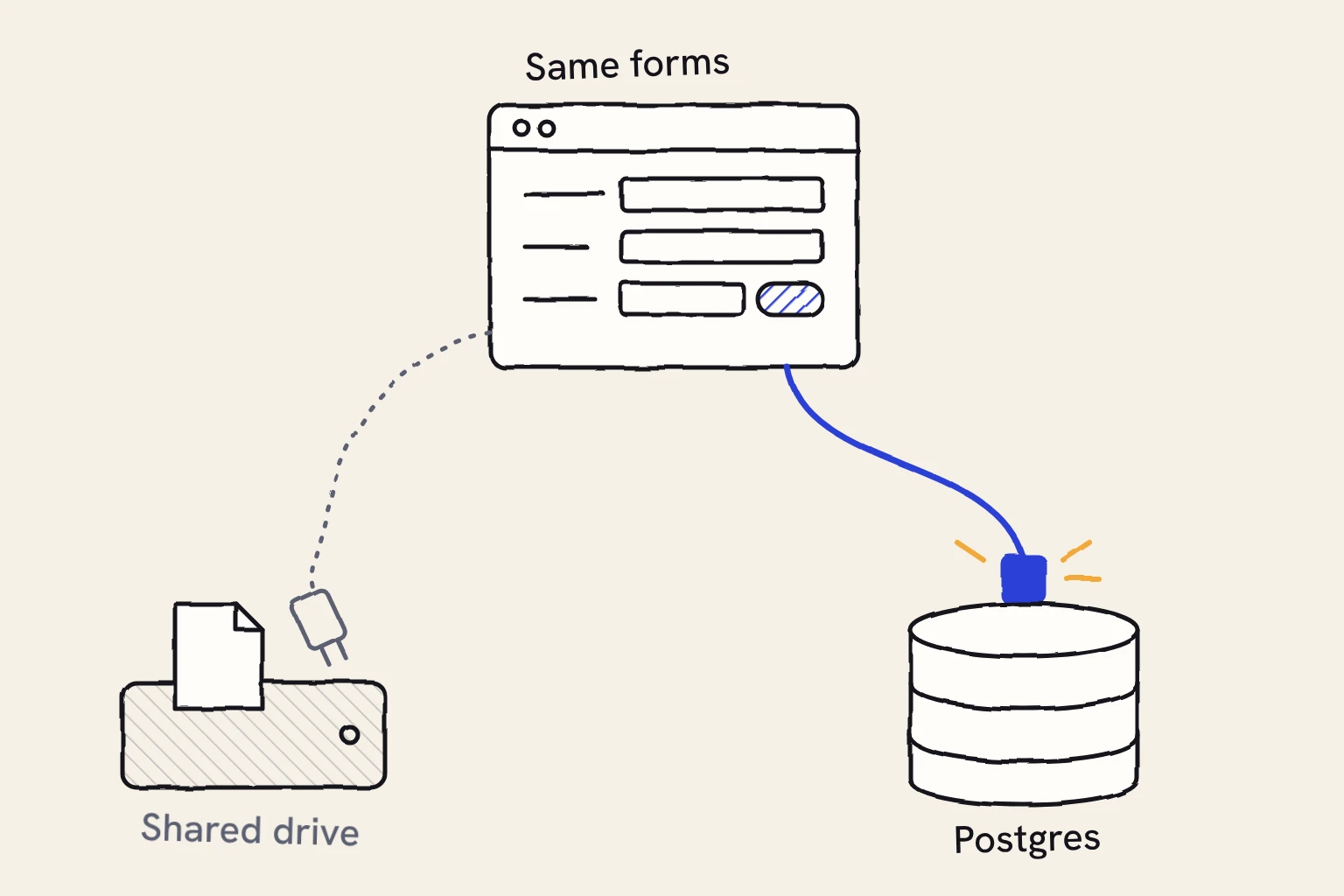
Split the database if it isn't already, with Database Tools, then Move Data, then Access Database, so forms and tables sit in separate files.
Create each table in Postgres with a primary key. Access treats a linked table without one as read-only, so no table can skip this.
Copy the data with the AutoNumber values unchanged, then set each Postgres sequence to carry on from the highest number.
Install the PostgreSQL ODBC driver on each PC, relink with the Linked Table Manager, and keep the old table names so forms and queries still find them.
Open every form people use and time the slow ones.
Some forms will slow down. Access runs many queries itself by pulling rows across the network, which was fine against a file next door and is slower against a server. Turn the worst into pass-through queries, which send the SQL to Postgres to run, or rebuild those screens first.
If the business already runs SQL Server, Microsoft's free SQL Server Migration Assistant for Access does this step for you, copying the tables to SQL Server or Azure SQL and relinking the file. Choose the database the finished web app will use, so the data only moves once. For us that's Postgres.
Access SQL and the data quirks to fix on the way
Access SQL is close to standard SQL without matching it, so each saved query needs translating. The date format catches out UK teams most: a date between # signs is always read month first.
| In Access | In Postgres |
|---|---|
| LIKE 'Smi*', with * and ? as wildcards | LIKE 'Smi%', with % and _ |
| #12/31/2025#, month first | DATE '2025-12-31' |
| FirstName & ' ' & LastName | first_name || ' ' || last_name |
| IIf(Paid, 'Yes', 'No') | CASE WHEN paid THEN 'Yes' ELSE 'No' END |
| Nz(Discount, 0) | COALESCE(discount, 0) |
| DLookup or DSum inside a query | A join or a subquery |
| Format(OrderDate, 'yyyy-mm') | to_char(order_date, 'YYYY-MM') |
| TRANSFORM ... PIVOT crosstab | GROUP BY, with the pivot done in the page |
Values that change shape
Yes/No fields store true as -1. Import them as boolean, and search the VBA for comparisons with -1.
A text field can hold both an empty string and Null, depending on its Allow Zero Length setting. Choose one meaning per column before importing, or filters will miss rows.
Multi-valued and Attachment fields have no Postgres equivalent. Flatten each into a child table with one row per value or file.
OLE Object fields usually hold images wrapped in an OLE header, so a straight copy gives files nothing can open. Extract them with a script that strips the header, and open a sample to check.
Lookup fields show a name and store an ID. Copy the ID and keep it as a foreign key.
From Access database to web app, one area at a time
Once both front ends use the same Postgres tables, there's nothing to keep in sync. Move one area of the business at a time, such as quotes, then jobs, then invoicing, and remove each area's forms from the Access front end as its pages go live.
The overlap has one trap. A rule written in a form's VBA applies only to people using that form, so the web app skips it, and so does anyone editing a linked table directly. Before both front ends write to a table, move its rules into the database as constraints or triggers, or into the app's API.
Staff can sign in to the web app with the Microsoft work accounts they already use, through Microsoft Entra ID. How Microsoft sign-in carries over, from our Power Apps guide
Printed reports usually move last and get missed first. Rebuild each as a PDF and have the people who print it sign it off, the same check we run when a FileMaker system moves. How the same move works for FileMaker
Before you retire the Access front end
Every form people used has a page, or an agreed reason to go
Every report people print has a PDF version they've signed off
Rules from form events are enforced by the database or the API
Excel imports and exports run by VBA have a replacement
The front end is removed from every PC, so nobody edits through an old copy
The original .accdb files are archived read-only
How long the move takes
Moving the tables and relinking Access usually takes one to two weeks, and it's worth doing for reliability even if the rest waits. Rebuilding a database of a few dozen tables, with its forms, reports and VBA, typically takes six to ten weeks in total. The amount of VBA predicts the effort better than the number of forms, so count the lines before estimating. How we build web apps
For a first figure, the free MVP Cost Calculator turns eight answers about your app into a rough estimate in development weeks and pounds. Estimate the rebuild with the MVP Cost Calculator
The table move plus a first area of the business often fits one of our fixed-price sprints. See what a fixed-price sprint includes
Frequently asked questions
- Can an Access database run in a browser?
- Not directly, since Microsoft retired Access web apps in 2018. Remote Desktop or Azure Virtual Desktop can show the Access window in a browser as a stopgap, but every user still needs Access and the same file sits underneath, so it fixes where people can work without fixing the database.
- Should the new back end be SQL Server or Postgres?
- Either works with Access linked tables. SQL Server suits a business that already runs it, and Microsoft's migration assistant automates the move. Postgres has no licence cost and is what most web app stacks use. Choose the one the finished web app will run on.
- Will Excel workbooks that read from Access still work?
- Not until they're repointed. Excel reaches Postgres through the same ODBC driver, so each connection needs updating as its table moves. Ask finance early, because these workbooks are rarely documented and they break quietly.