Migration guide · Internal tool builders
AppSheet migration once your app outgrows the sheet
By Max Winter-Leinweber7 min read
In short
An AppSheet migration makes sense once the app reaches people outside your Workspace, holds more data than a sheet can carry, or runs a process the business can't stop. There is no code export, so the app is rebuilt. The data is the easy part: it already sits in your own Google Sheets, Excel files or database, and the new app can use it from day one.
- Code export
- None, the app definition stays put
- Your data
- Already in your Sheets, Excel or database
- Hardest part
- Expressions and offline use
- Typical timeline
- 3 to 6 weeks
When should an AppSheet app become a coded app?
When it stops being a tool for colleagues who already live in Google Workspace. AppSheet is very good at inspections, stock counts, job sheets and approvals for an internal team. The trouble starts when the audience, the volume of data or the cost of a mistake changes.
Customers or contractors need their own logins. Each signed-in user counts against a per-user plan, and a public app without sign-in needs a separate Publisher Pro plan unless you are on Enterprise. Public apps can't use security filters, and Google's advice is to assume anyone can see all of their data.
Syncs keep getting slower. AppSheet copies the rows each user can see onto their device, which is what makes offline work possible. As tables grow and virtual columns pile up, every sync takes longer.
The data source is straining. A Google Sheet edited by the app and by staff typing into the same tabs is fragile, and AppSheet databases on Core plans hold 2,500 rows each.
Edits go straight to everyone. Changes are made in a browser editor with version history but no automated tests, so one wrong expression reaches every user at their next sync.
If you're still deciding whether a new idea needs code at all, our free Build or No-Code Quiz asks seven questions and gives a straight answer. Take the Build or No-Code Quiz
When the sheet behind the app is what's creaking, the warning signs tend to appear in a predictable order. Signs you have outgrown Google Sheets as a database
Your data never lived in AppSheet
AppSheet reads and writes data that sits in your own accounts, so the data comes with you by default. What you rebuild is the app definition: column settings, slices, views, actions, bots and every expression.
Google Sheets and Excel files stay in your Drive or OneDrive. The new app can read them during the build, and the data moves into Postgres at cutover.
Cloud SQL, MySQL, Postgres or SQL Server databases can stay exactly as they are, often with no schema changes for the first release.
AppSheet databases are the exception, because they live with the AppSheet account. Copy them out first: a CSV export action in the app handles modest tables, and the AppSheet API, on plans that include it, reads rows in bulk.
Image and file columns hold a path, while the files sit in the app owner's Google Drive, by default under an appsheet folder. Copy them to your own object storage and rewrite each path on import.
AppSheet has no export of the app definition, so ask whoever built the app to sit with the editor open and write down every table, column type, slice, view, action and bot. That inventory is the specification, and it is quicker to make with the builder in the room than from screenshots afterwards.
From slices and security filters to code
Most AppSheet features have a direct equivalent in a coded app. The difference is where the rule runs: AppSheet decides a lot on the device, and a web app decides it on the server.
| AppSheet | What it does | In a coded app |
|---|---|---|
| Column types | Enum, Ref, Image, LatLong and other typed columns over a sheet or table | Postgres columns with constraints, foreign keys and a files table |
| Key column | Identifies each row, often a UNIQUEID() value | A primary key, with the AppSheet value kept in its own column |
| Ref columns and REF_ROWS | Links between tables and lists of related rows | Foreign keys, and a query for the related rows |
| Virtual columns | Values recalculated on every sync | Views, generated columns or server code |
| Slices | Filtered subsets of a table that views are built on | Query functions or database views |
| Security filters | Decide which rows reach each user's device | Authorisation on every request, plus Postgres row level security |
| Views | Deck, table, form, detail, map and dashboard screens | Pages and components designed for each task |
| Actions | Buttons that change data, open links or move between views | Server endpoints behind buttons, each with validation |
| Bots and automations | Emails, PDFs and updates triggered by changes or schedules | Background jobs, scheduled tasks and email templates |
| USERSETTINGS and roles | Per-user preferences and access | A users table with roles and saved preferences |
Sign-in, security filters and offline use
Most people sign in to AppSheet with a Google account, so add Google sign-in to the new app and import the user list with roles before launch. Nobody needs a new password.
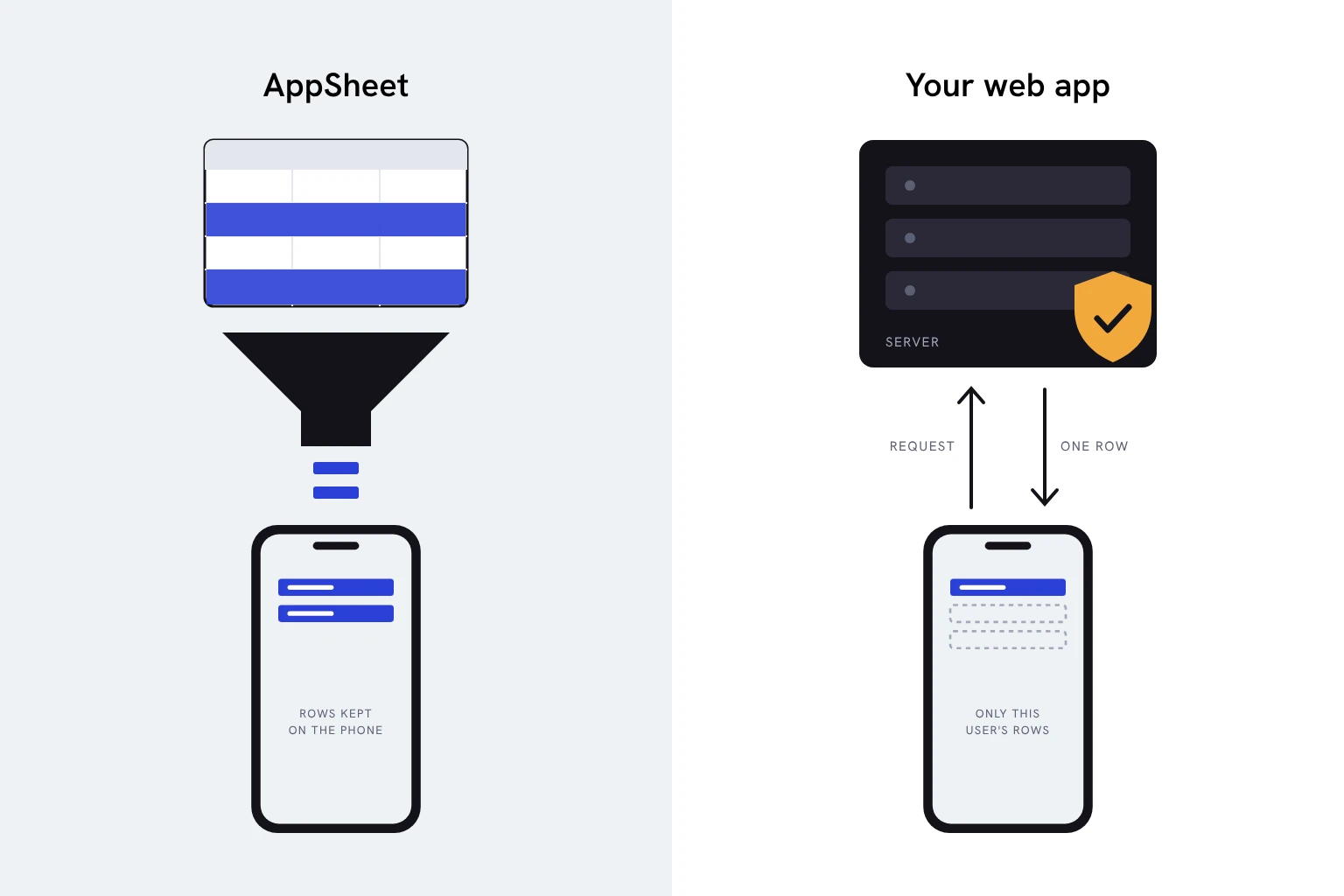
Security filters change shape in the move. In AppSheet they decide which rows are copied to each device. In a web app, the server checks every request against the signed-in user, and Postgres row level security can enforce the same rule again inside the database. Test each role by signing in as it, because an admin account sees everything and hides mistakes.
Offline use is the decision that shapes the build most. AppSheet makes it effortless, so teams often rely on it without anyone writing it down. Ask who uses the app with no signal: in a basement plant room, on a farm, in a delivery van. If nobody does, a normal web app is simpler and cheaper. If they do, plan an installable app that saves changes on the device and sends them when the signal returns, and budget the extra time. How an installable web app works offline
An AppSheet migration in four steps
Build against the data you already have, let a small group try the new app, and move the data into Postgres only when the switch happens.
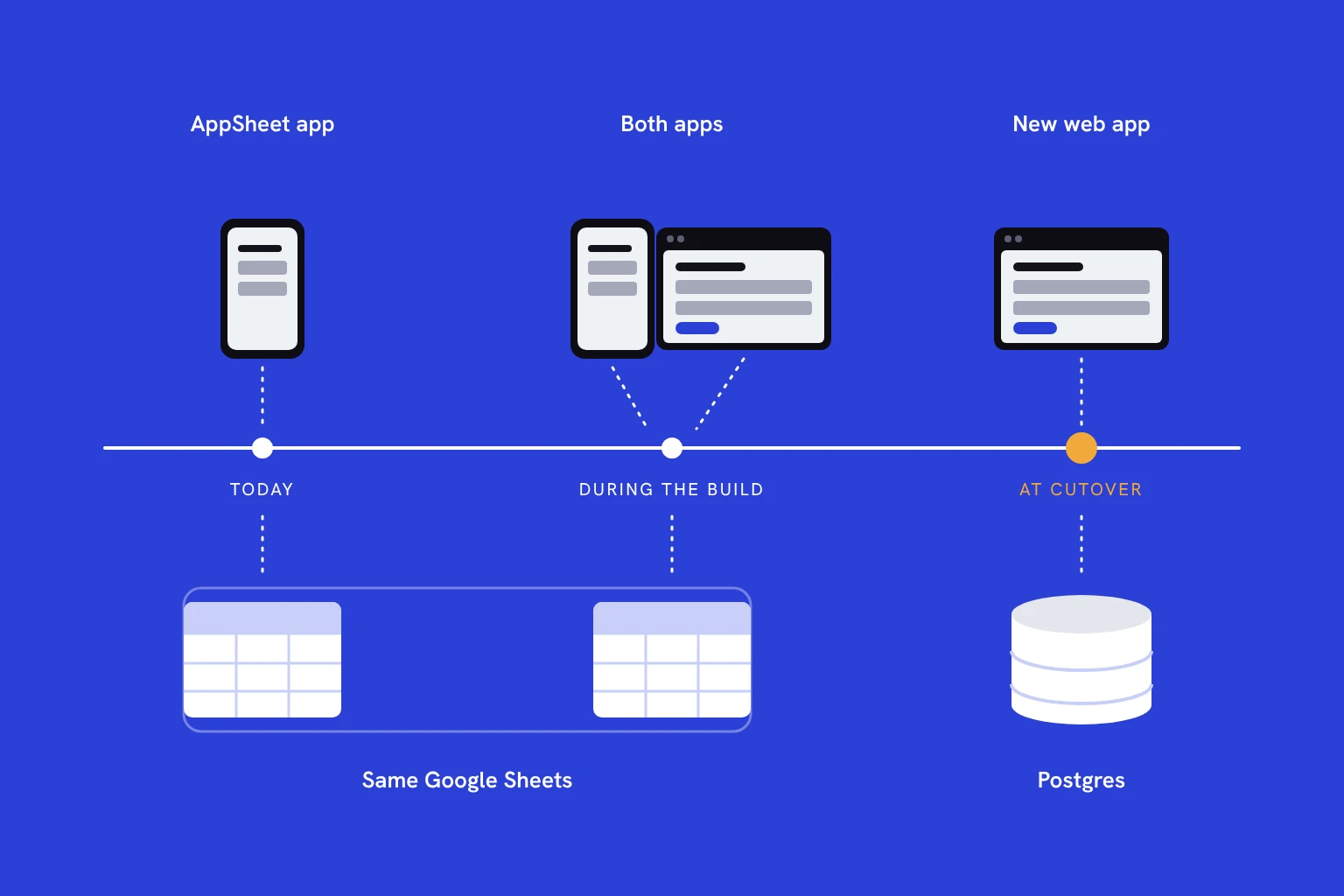
Build the new app on the same sheets or database, reading them through your own server code, so you can compare screens against AppSheet with real data.
Give a handful of users the new app while everyone else stays on AppSheet. Decide which app writes to each table during this stage, and let only that one.
Pause edits in AppSheet, copy the data and files into Postgres and object storage, and check row counts table by table.
Switch everyone over, set the AppSheet tables to read-only, and keep the app for a few weeks as a reference.
Then lock the spreadsheet itself with view-only sharing or protected ranges. Someone always has a bookmark to it, and updates typed there after cutover never reach the new app.
Time and cost
Most AppSheet apps take three to six weeks to rebuild and switch over. The number of tables, security filters and bots sets the pace, and offline support adds time on top. A stable internal app whose users are all on your Workspace plan is usually cheaper to keep, so the move pays when customers, contractors or volume are involved. A focused rebuild often fits one of our fixed-price sprints. See what a fixed-price sprint includes
Frequently asked questions
- Is AppSheet included with Google Workspace?
- AppSheet Core is included in many Workspace editions, including Business Starter, Standard and Plus, for domain-verified accounts. That makes internal apps cheap to run, which is a good reason to leave internal-only apps where they are.
- Will the new app open in the AppSheet mobile app?
- No. AppSheet apps run inside its own app or in a browser on AppSheet's address. The rebuilt app lives at your own web address, where people can add it to their home screen, and it can be wrapped for the app stores if you need a listing.
- What happens to the PDFs and emails our bots create?
- They become server jobs. PDFs are generated from HTML templates, using your current Google Docs templates as the design reference, and emails go out through a transactional email provider from your own domain.