Guide
Mobile web development decisions to make before you build
Mobile web development is building a website or web app that people can finish their task on in a phone's browser, not just one that fits the screen. Before you brief a developer, settle five decisions: which screens are designed for the phone first, where a half-filled form survives, how people sign in, what each form field asks of the keyboard and which phones and browsers you test. Each one changes the build, and each is cheap to settle now.
By Max Winter-Leinweber7 min read
- Worked example
- Season sign-ups for a junior football club
- Most missed test
- A link opened inside a social app
- Not covered here
- Installing and offline use
Is mobile web development enough for your product?
Usually, yes. If people arrive from a link and finish a task in a few minutes, a web app that works well in a phone's browser serves them without an app store or an install. The exceptions are products where the phone itself is the point, such as background location, Bluetooth or heavy camera work. Check your product against our web app or mobile app decision table.
Installing to the home screen and working with no signal are a separate layer of work on top of a mobile web app, and most first releases don't need them. This guide covers the decisions every mobile web app faces before that layer. What installing and offline use add to a build.
The example throughout is a junior football club taking season registrations. A parent enters their child's details, agrees to the club's photo and medical consent, pays the season's subs and gets a confirmation. The club secretary sees every registered player, by age group, with what's still owed.
Which screens should be designed for the phone first?
The ones people reach from a link on their phone. Work out where each journey starts, and design for that screen first; the other size then gets a version that works rather than one that was planned.
| Journey | Where it usually starts | Design first for |
|---|---|---|
| Register a child and pay | A link in the club's Facebook post or the parents' group chat | Phone |
| Check what's still owed | A reminder email, opened on the touchline | Phone |
| Export a team list for the league | The secretary's laptop, once a season | Desktop |
| Review all registrations | The secretary's laptop, most evenings in August | Desktop, usable on a phone |
The secretary's screens are a dashboard in all but name, and the mistakes there are of a different kind. The dashboard design mistakes worth catching early.
Where does a half-filled form survive?
Decide this before the form is built, because phones throw away pages people aren't looking at. A parent halfway through registration leaves to find their child's NHS number in another app, or approves the payment in their banking app. When memory runs short, the phone's browser unloads the page in the background, and on return it reloads, empty unless someone planned otherwise.
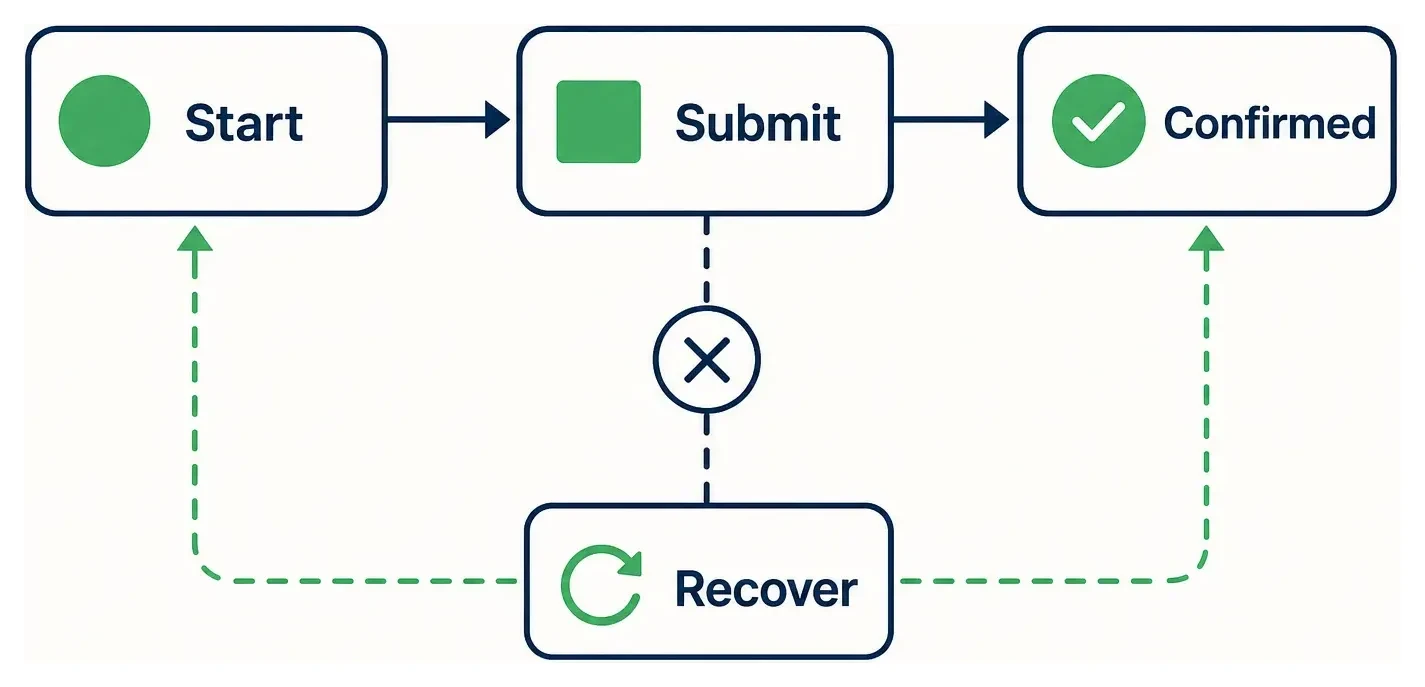
There are three options, and the length of the form picks between them:
| Keep the answers | Suits | The catch |
|---|---|---|
| Nowhere | A form of four or five fields | Anyone interrupted types it all again |
| In the browser, on that phone | A longer form people fill in without signing in | Lost if they switch browser or phone |
| As a draft on your server | Several steps, or anything with uploads | Needs an account or a saved link, and more build time |
The club form sits in the middle: one child, a dozen fields and a consent box. Keeping answers in the browser covers the parent who nips off to their banking app. For the payment step itself, the club's record of who has paid should come from the payment provider telling the server, not from the parent's phone making it back to the confirmation page.
How will people sign in from a link?
Pick a sign-in method that still works when the link opens inside another app. Facebook, Instagram and TikTok open links in their own built-in browsers, which keep sign-ins separate from Safari or Chrome. Send that parent a magic sign-in link by email and it opens in a different browser: they're signed in there, and the form they started is still waiting, signed out, inside Facebook.
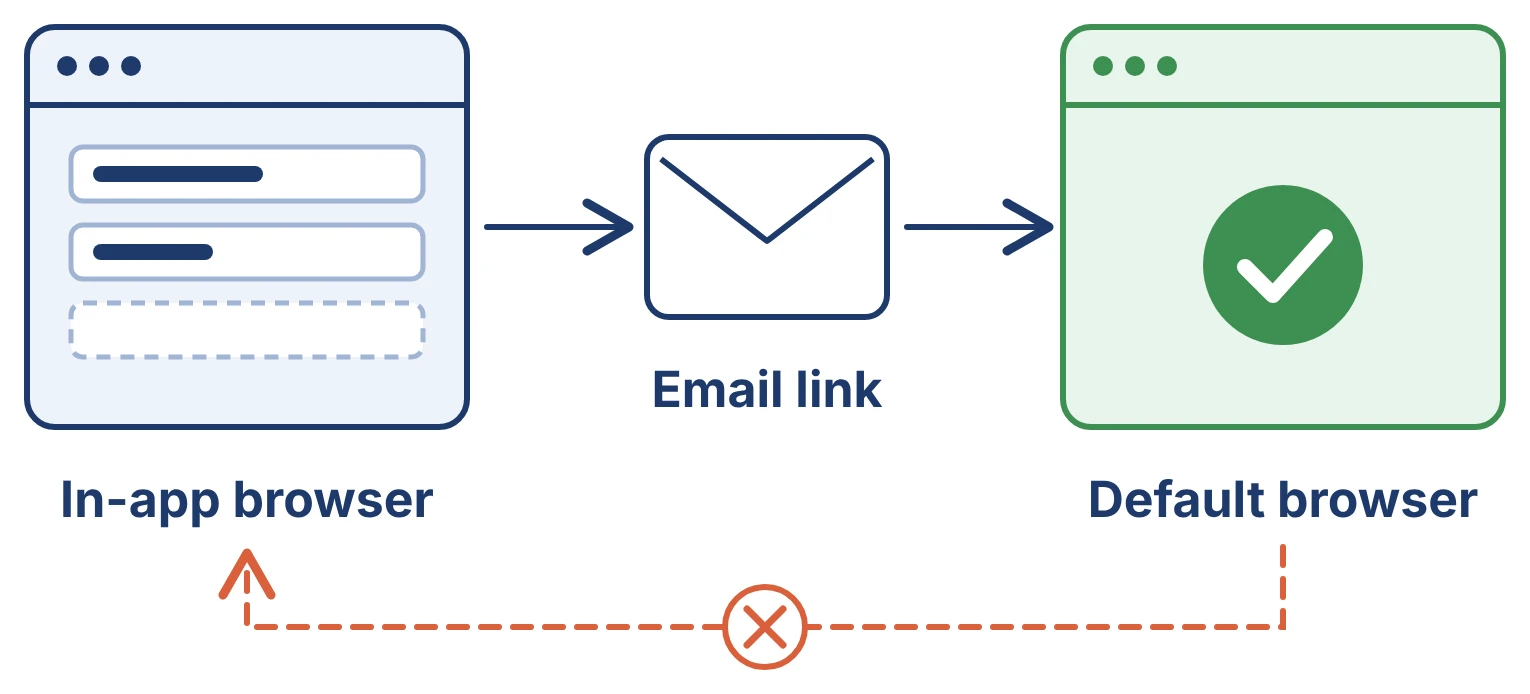
A code typed in. Suits people who arrive from social apps. The code works whichever browser they're in, and phones can offer to fill it in from a text message.
A magic link. Suits people who start from email, because the link opens where they'll carry on.
A password. Suits people who come back weekly. Mark the fields properly so the phone's password manager fills and saves them.
For the club, a code by text or email fits the first visit, and none at all might fit better: registration can work without an account, with the confirmation email carrying a private link back to the child's record.
What does each form field need from the keyboard?
Each field should bring up the right keyboard and accept answers the way people actually type them. On a phone the keyboard covers half the screen, so a form that's fine on a laptop can hide its own button. Put these in the brief as things to check:
Email, phone and number fields open the matching keyboard.
Name, address and card fields are marked so the phone can fill them in.
Postcodes are accepted with or without the space and in lower case.
Text in fields is large enough that an iPhone doesn't zoom in when someone taps it.
The submit button isn't hidden behind the keyboard or a bar fixed to the bottom of the screen.
Each error appears next to its field, in words, and keeps everything else the parent typed.
Labels stay visible while typing, rather than placeholder text that disappears.
Which phones and browsers should you test on?
Test on the route your link actually travels, not only on the developer's own phone. For the club, that means the form opened from the Facebook post, from the group chat and from the reminder email, on an iPhone in Safari and on an older Android phone in Chrome, which is where slow pages show first.
Do at least one full run on a slow connection, from the link to the confirmation, including the trip to the banking app and back. Large images and scripts that load before the form can be used are the usual reasons a page that's quick on office Wi-Fi drags on a touchline. Write down the browsers you checked and any known gaps, so nobody is surprised later.
Testing is one line of a longer launch list. Our free App Launch Checklist builds the rest for your app from five questions, covering legal pages, payments, SEO and analytics. Build your list with the App Launch Checklist.
Do you need a mobile developer for a mobile web app?
No. Mobile web application development is web work: you need a web developer who designs for the phone and tests on real ones. Mobile app developers specialise in iOS and Android apps, app stores and device features; a mobile web app needs none of those, and paying for them buys skills the product won't use.
That's the work we do. We build web apps with the phone journeys designed first, at a fixed price of £10,000 + VAT for a two week sprint or £20,000 + VAT for three, each with a week of changes from your feedback and a handover week after launch. Send us the journey table and the form fields, and we'll tell you on a free 30 minute discovery call which decisions change the scope. Book a discovery call.
Frequently asked questions
- Is mobile web development the same as responsive design?
- Responsive design is part of it: the layout adapts to the width of the screen. Mobile web development also covers what happens when the page is interrupted, how people sign in, how forms behave with a phone keyboard and how fast the page is on a weak signal.
- Can a mobile web app take card payments?
- Yes. Payment providers such as Stripe offer checkout pages built for phones, and many support Apple Pay and Google Pay in the browser. Many UK cards ask the customer to approve the payment in their banking app, which is why the trip away from the page and back needs testing.