Guide
PWA development without the unnecessary extras
PWA development adds browser features such as installing to the home screen, working offline and sending notifications to a web app. Making an app installable is a small job; letting people edit offline is a big one. Build only what your users need, because a PWA is still a website underneath and can't do everything a native app can.
By Max Winter-Leinweber8 min read
- Built from
- Manifest, service worker, HTTPS
- Smallest job
- Making it installable
- Biggest job
- Offline editing and sync
What does PWA development add to a web app?
It adds a few browser features on top of a web app that already works. It doesn't replace building that app. You still need the screens, the business rules, the database and any payments or integrations, exactly as you would for any other web app.
Three pieces do the PWA part. A web app manifest gives the browser the app's name and icons so it can be installed. A service worker sits between the app and the network, keeping copies of files and answering some requests when there's no connection. And the app has to be served over HTTPS, because browsers won't run a service worker without it.
An install icon won't rescue an app that's slow or confusing. If people can't finish the main task in an ordinary browser tab, fix that first. Giving them another way to open it won't help.
Can a PWA do everything a mobile app can?
No. A PWA handles a lot of everyday app tasks, but what it can reach on the device, and what it can do in the background, depends on the browser and operating system. These are the requirements where that matters most.
| Requirement | What to watch for in a PWA | What to check |
|---|---|---|
| Home screen icon | Installing works differently in each browser | The steps your users' browsers actually show |
| Working offline | Has to be designed in, screen by screen | Which data people can read offline and which they can edit |
| Push notifications | Support and permission rules vary | The devices, whether the app must be installed, and consent |
| Background uploads | Can be paused or stopped when the app closes | What happens if someone closes the app mid-upload |
| Specialist hardware | Browser support may be patchy or missing | The exact device and the browser feature it needs |
If the product depends on continuous background tracking or a connection to a particular device, prove that works before you pay for the full build. A demo in a desktop browser doesn't count. It needs to run on the phones your users actually carry.
If you haven't settled on a web app or a native one yet, start with our comparison of web and mobile apps. Decide that before you pay for features your platform can't reliably support.
Which PWA features belong in the first release?
Only the ones that remove a real obstacle from the main user journey. The browser allows plenty more, but every feature adds build and testing time.
Say you're building an app for tenants to report repairs. A tenant opens a link, describes the problem, adds a photo and sends it. Most of them will have a signal at home, so a clear confirmation and a photo upload that doesn't fail matter far more than an install button or push notifications.
Now picture an inspection tool used in basements and plant rooms with no reception. Keeping a half-finished inspection on the device might be essential there, and that one requirement changes the data model, the interface and the testing. Offline support isn't a setting you switch on at the end.
For each feature someone proposes, write down three things:
The obstacle.. What stops the user finishing their task today?
The behaviour you need.. What should happen when the connection drops, a permission is refused or the user never installs the app?
What can wait.. Which parts can sit until the user is back online?
If nobody can name the obstacle, leave the feature out for now. An install prompt on someone's first visit usually gets in the way of the thing they came to do.
What does it take to make a web app installable?
Less than most people expect: a manifest, a set of icons and HTTPS. Once those are in place, Chrome and Edge offer to install the app, and you don't need offline support first.
The manifest is a short file that tells the browser the app's name, the page it opens on, its colours and whether it opens in its own window without the address bar. On Next.js it's a single file in the project. The one for this website is about twenty lines.
The icons take more care than the code. You need at least a 192 and a 512 pixel version. Android also crops icons into circles and rounded squares, so add a "maskable" icon with the logo inside a safe area in the middle. Without one, Android shrinks your icon onto a white background, which rarely looks good.
iPhones need their own instructions
Safari never offers to install a web app. People have to find Add to Home Screen in the Share menu themselves, and most don't know it's there. If installing matters to your product, add a small screen that shows iPhone users how, and hide it from anyone who already has the app on their home screen.
Chrome and Edge also let you add your own install button. It's tempting, but it does nothing on an iPhone, so it can't be the only way in. The iPhone instructions matter even more if you plan to send notifications, because there web push only works once the app is on the home screen.
Which screens should work offline?
Decide screen by screen, because each kind of content needs its own caching rule. The service worker can serve a saved copy, fetch a fresh one or do both. Pick the wrong rule and the app either breaks offline or shows people out-of-date information.
| Content | Example | Caching rule | What users see offline |
|---|---|---|---|
| The app itself | Layout, scripts, styles and icons | Use the saved copy, update it in the background | The app opens straight away |
| Data that rarely changes | Help pages, a product catalogue | Show the saved copy, refresh it when online | The last version they loaded |
| Live data | Availability, balances, stock levels | Always fetch fresh, fall back to a saved copy | The saved copy, marked with when it was last updated |
| Private or one-off | Payment pages, one-time links | Never save it on the device | A message saying it needs a connection |
At the very least, add an offline page. Without one, anyone who opens the app with no signal gets the browser's own error screen (Chrome's dinosaur), and the app looks broken.
The saved files also need replacing whenever you release a new version, or people carry on using yesterday's app. Get that right in the first release. If the update mechanism itself is broken, fixing it means waiting for every phone to pick up the fix.
Editing offline is a different job
Letting people add or change things offline is where the effort jumps. The app has to keep their work in the browser's own database, queue it, send it when the signal returns and cope when two people have changed the same record. And people need to see which stage their work is at.
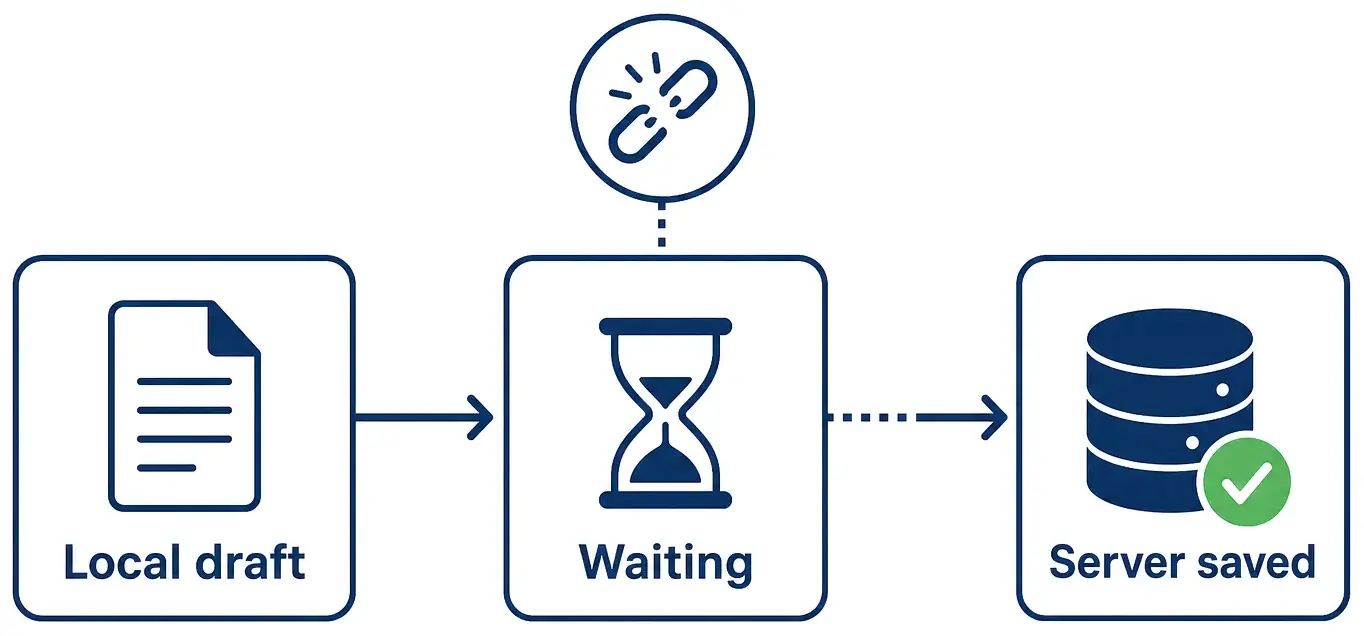
Frameworks are starting to help with the simplest part. Next.js now has an experimental setting that holds a request when the connection drops and sends it again when the signal returns. It only covers screens the app has already loaded, though, so someone opening the app from cold with no signal still needs a service worker and a local database.
Testing all this takes more than a demo on the developer's laptop. Our guide to choosing a progressive web app development company lists the checks to ask for, from dropped connections to app updates, so you can sign off the build yourself.
How much does each PWA feature add to the build?
Installing is the smallest job and offline editing the biggest, with most features somewhere in between. The table gives our rough sense of each, assuming the app already works well online.
| Feature | Relative effort | What drives the effort |
|---|---|---|
| Installable app | Small | The icons, plus instructions for iPhone users |
| Offline page and saved app files | Small to medium | Replacing saved files cleanly on every release |
| Reading saved data offline | Medium | How much data there is and how fresh it must be |
| Push notifications | Medium | A server to send them, asking permission at the right moment, the iPhone home screen rule |
| Offline editing and sync | Large | The local database, the upload queue, clashing edits and the testing |
| Finishing uploads after the app closes | Large, or not possible | Only Chrome and Edge support it, so other browsers need a fallback |
Push notifications are the one people most often underestimate. Sending one message in a demo is quick. Deciding who gets which message, when, and how they turn it off takes longer, and so does handling the people who tap "Don't allow".
We quote first PWA releases as a fixed price starting at £10,000 plus VAT, and before you commit we work out which rows of this table fit the sprint. Compare the two packages.
Frequently asked questions
- Do I need a service worker to build a PWA?
- Not to make it installable: Chrome and Edge only need a manifest and HTTPS. You do need one for an offline page, saved app files or push notifications, which is most of what makes a PWA worth installing.
- Does a PWA need to be in the App Store or Google Play?
- No. People open it from a link and can add it to their home screen, so there is no store listing or review to get through. If you need a store listing, a PWA can be packaged for Google Play, but Apple tends to reject apps that are little more than a website in a wrapper.
- Is a PWA cheaper than a native app?
- Usually, because one codebase covers phones, tablets and desktops and there is no app store release process. The saving shrinks as you add offline editing and device features, which is why we scope those separately.