Migration guide · AI app builders
Moving a Rocket.new app to your own hosting and repository
By Max Winter-Leinweber8 min read
In short
A Rocket.new app is one of the easier AI-built apps to take over, because the Supabase project behind it is usually in your own account already. The migration is about the code, the hosting and the secrets. The framework Rocket chose decides how the code moves: Next.js projects sync both ways with GitHub, while React and Flutter projects come out as a download. Web apps run on Rocket's Vercel account until you move them.
- Code export
- GitHub sync or zip, by framework
- Stack
- Next.js or React, Flutter, Supabase
- Database
- Your own Supabase project
- Usual approach
- Keep the code, move the hosting
How much of a Rocket.new app is already yours?
More than with most AI app builders. Rocket, built by a team in Surat that raised a $15 million seed round in September 2025, doesn't run its own database for you. It connects to Supabase through your Supabase login and creates the project there, and Stripe and AI providers are connected with keys from your own accounts.
| Part | Who holds it | What the move involves |
|---|---|---|
| Database and sign-in | Your Supabase account, through Rocket's connector | Check which Supabase organisation it's in |
| Code | Rocket, plus GitHub if you connected it | Depends on the framework, see below |
| Web hosting | Rocket's Vercel account, unless you connected your own Netlify | Deploy from your own repository and host |
| Stripe and AI keys | Your accounts, entered in Rocket's integrations panel | Recreate them in the new host |
| Mobile builds | Built by Rocket for testing, published from your store accounts | A build process a developer can repeat |
| Custom domain | Your registrar, with DNS pointed at Rocket | Change the records at the switch |
Check one thing early. Rocket's Supabase connector works across the whole workspace, so the project sits in whichever Supabase organisation the person who first connected it chose. If that's a personal organisation, transfer the project to one the company owns before anything else. Supabase moves a project between organisations with its data in place, and if Rocket loses sight of it afterwards, reconnect the connector to the new organisation.
The framework Rocket picked decides the route
Look at the project's framework before planning anything. Rocket sets it when the task is created, and its docs describe different export options for each one. Most web apps are Next.js with TypeScript, some are React with JavaScript, and mobile apps are Flutter.
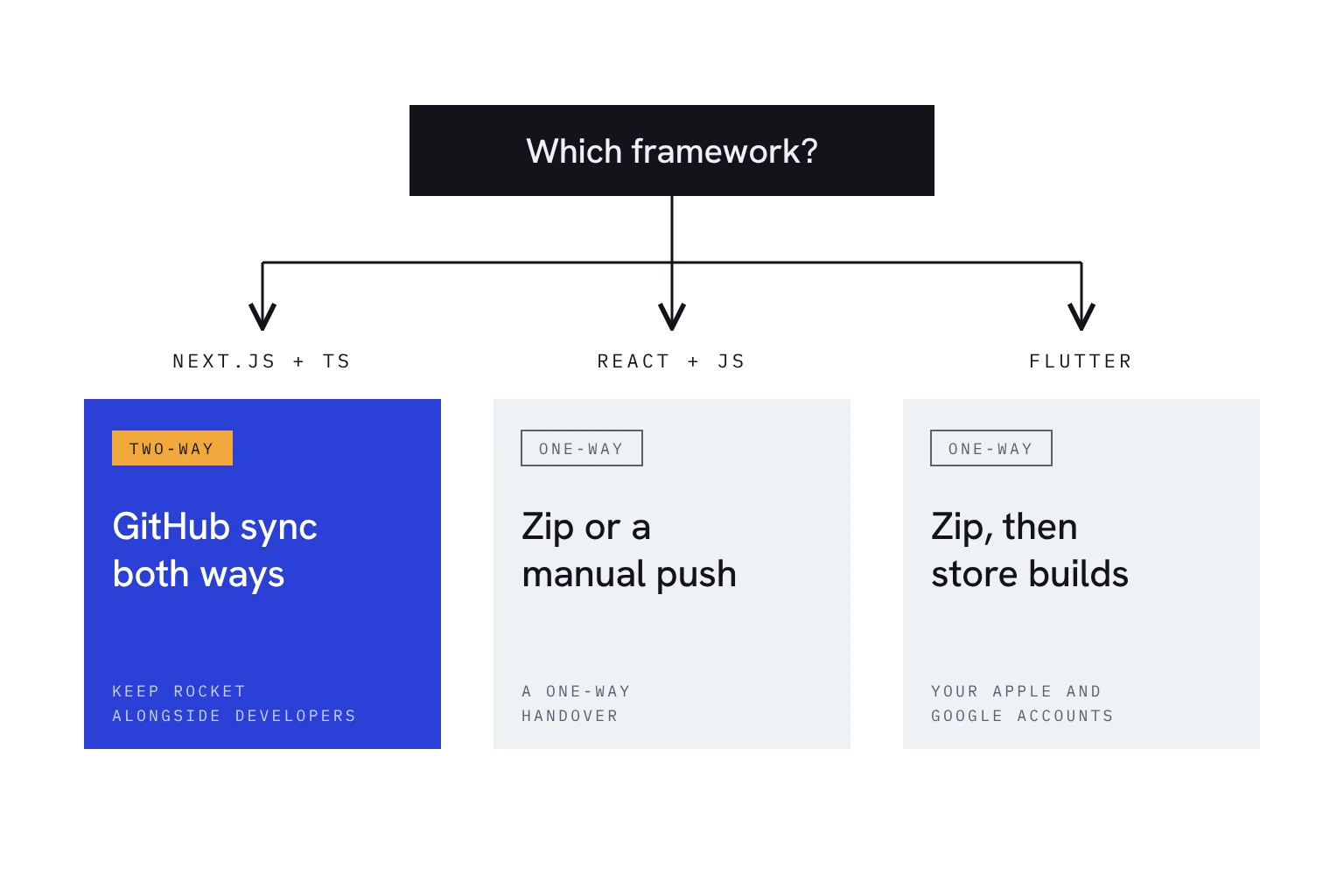
Next.js with TypeScript. The only framework with two-way GitHub sync. Rocket pushes to a branch and pulls from main, so developers and Rocket can work on the same repository.
React with JavaScript. One-way, manual pushes to GitHub, or a zip download on a Pro plan or above. Treat the export as a handover: after it, changes happen in the repository.
Flutter. The same manual push or zip. The mobile app then needs building and publishing outside Rocket, covered below.
A React app also renders its pages in the browser. That's fine behind a login, but public pages such as listings or a blog can be slow to show up in search. Our free SEO Check audits any page for titles, descriptions, headings, indexing and share previews, so run it on a public page before deciding whether those pages need moving to server rendering. Audit a public page with the SEO Check
Working with Rocket's GitHub sync instead of leaving
With a Next.js project you don't have to stop using Rocket to bring developers in. Rocket's docs say it pushes its changes to a branch called rocket-update and opens a pull request to main, and that it always pulls from main. Developers work on their own branches, and Rocket's changes arrive as pull requests like anyone else's.
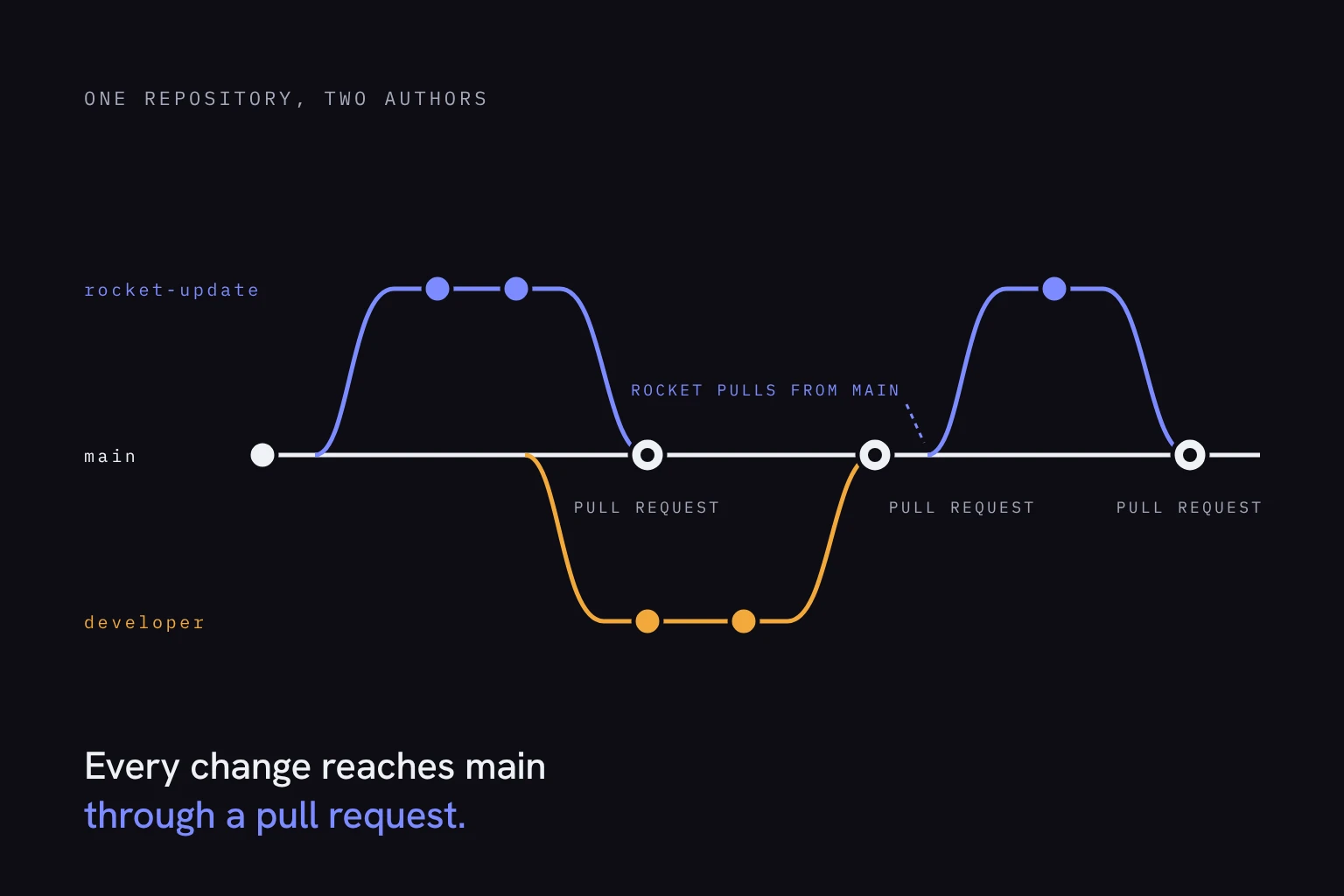
That only stays safe with some rules on the repository:
Move the repository into your company's GitHub organisation and reconnect Rocket to it there.
Protect main, so nothing reaches it without a pull request and passing checks.
Review Rocket's pull requests the same way as a developer's, with tests running against a staging copy of the app.
Merge or close each rocket-update pull request before asking Rocket for the next change, so its branch doesn't drift away from main.
Keep schema changes to one route, through migration files in the repository, rather than some from Rocket and some from developers.
Many teams use Rocket this way for a while, for new screens and quick experiments, and stop once developers are faster than prompting.
Get the Supabase schema into the repository
The database doesn't need moving, but its history does need writing down. Rocket generates migration scripts from the chat and you apply them with its Push to Supabase button, so the live schema may include changes that never reached GitHub. Pull the current schema into migration files with the Supabase CLI, commit them, and make every later change a reviewed migration.
Then create a second Supabase project for staging. Rocket links each task to exactly one Supabase project, and its docs warn that two apps sharing one database share every schema change. If two Rocket tasks point at the same project, split them before either goes further.
Check the access rules while you're there. Rocket's docs recommend row level security for each user's data, but a rule that exists isn't always the right one, and the browser talks to Supabase directly. Our Lovable guide works through the same Supabase audit table by table. How to audit Supabase row level security
The exported .env holds placeholders, not your keys
Expect to fill in every secret again. Rocket's docs say a web app's export includes an environment template with placeholder values, while the real values for Supabase, Stripe and other integrations live in the integrations panel in Rocket's project settings. Nothing in the download will connect to anything until someone adds the keys.
Supabase. The project URL and public key go in the host's settings. The service role key, which bypasses every access rule, stays in edge functions and never reaches the browser.
Stripe. The new host gets a new webhook endpoint, and each endpoint has its own signing secret. If the app is still on test keys, Rocket's docs point out that products must be recreated in live mode when you switch.
AI providers. Rocket's AI integrations use keys from your own provider accounts, billed by the provider, so nothing changes except where the key is stored.
Replace any key that was ever pasted into the chat instead of the integrations panel. The secrets check in our vibe-coded app audit covers where the rest belong. Where an AI-built app's secrets belong
Moving the web app off Rocket's Vercel account
Deploy from your own repository to a hosting account the company owns, run it on a staging address, then move the domain. Rocket publishes web apps to its own Vercel account by default, and to your Netlify account if you connected one. Either way the app should end up deployed from your GitHub, so a merge to main is what ships it.
The repository deploying to the company's Vercel, Netlify or other host, with previews for each pull request
Every environment variable set for staging and production separately
Supabase auth redirect URLs updated for the new domain, or sign-in fails after the switch
Google and GitHub sign-in apps updated with the new callback addresses
A new Stripe webhook endpoint and its signing secret added
DNS records Rocket asked for replaced with the new host's, with a short time to live set the day before
Leave the Rocket deployment running, untouched, for a week or two in case you need to switch back.
Flutter apps already ship from your store accounts
Rocket can build an APK for testing on Android, but publishing has always gone through your own accounts. Its docs say Google Play needs your developer account, and that iOS apps reach the App Store by downloading the Flutter code and submitting from Xcode with your Apple developer account. So the store listings are already yours, and the moved app ships as an update.
What's usually missing is a build anyone else can repeat. Whoever made the first release built it on their own machine, with the Android upload key and Apple signing set up there. Put the upload key in the company's password manager, set up builds in a CI service rather than on one laptop, and write down the steps. Mobile previews stay on Rocket's Netlify account, which you can't connect your own domain to, so they won't move. Who should hold the accounts that ship app updates
Flutter is one route among several for mobile, and hiring for it differs from React Native. If you're bringing in developers, that's worth knowing before you choose who. React Native or Flutter, compared on hiring
How long a Rocket.new migration takes
Usually one to three weeks for a web app, because the database stays where it is. The time goes on getting the schema into migrations, checking access rules and filling in secrets, rather than moving data. A Flutter app adds the work of setting up repeatable builds and a store release.
We take Rocket apps through these steps inside a fixed-price sprint, with the repository, Supabase project and hosting in your company's name from the first day. See what a fixed-price sprint includes
Frequently asked questions
- Can I cancel Rocket once the app is moved?
- Yes. The code, the Supabase project and the hosting will all be in your accounts, so nothing depends on the Rocket subscription. Disconnect the Supabase connector only once you're sure, because Rocket's docs say disconnecting removes it for every project in the workspace, and keep a final copy of the code first.
- Can I import an existing repository back into Rocket?
- Only Next.js projects written in TypeScript, according to Rocket's docs. A React or Flutter project that developers have taken over can't go back into Rocket, which is one more reason to treat their export as a one-way handover.
- What if Rocket built the app on a paused Supabase project?
- Supabase pauses inactive projects on its free plan, and Rocket's troubleshooting docs list a paused project as a common cause of errors. A paused project restores from the Supabase dashboard. Move a live app to a paid Supabase plan so it can't pause and gets daily backups.