Guide
Mobile app development checks a web build skips
Mobile app development has all the work of a web build, plus the work that comes from software living on someone's phone and reaching it through a store. Every release waits for review, old versions keep running after you ship a new one, permission prompts rarely get a second chance, saves have to survive a dead signal, and whoever holds the accounts and keys controls every update. This checklist covers only those parts, so you can put them in the brief before anyone quotes.
By Max Winter-Leinweber7 min read
- Written for
- Founders who've chosen an installed app
- Worked example
- A dog walking company's app
- Not covered here
- Web or app, and which framework
What mobile app development adds to a web build
The task, the server rules and the database work the same way in a mobile app as in a web app. What's new comes from two places: the app runs on phones you don't control, and every version passes through Apple's and Google's stores. If you haven't yet settled whether your first release needs to be an installed app at all, start with our decision table, because most don't. Check whether you need an app with our web app or mobile app decision table.
The example throughout is a dog walking company with a dozen walkers. A walker starts a walk when they collect a dog, the app records the route while the phone sits in their pocket, and they take a photo at drop-off. The owner gets a notification that their dog is home, with the photo and a map of the walk. Background location, the camera and notifications are the phone's own features, which is why this one is an app.
Plan every release around store review
Nothing reaches users until Apple and Google have reviewed it, and that applies to your fixes as much as your launch. On the web, a bug found on Monday morning can be fixed by lunchtime. In an app, the fix waits for review, then for each walker to install the update.
Test builds reach the walkers through TestFlight on iPhone and a testing track on Google Play before anything goes to review.
The launch date leaves a few days for review, and a few more in case the first submission is turned down.
Reviewers get a working demo account, because an app that needs a sign-in can't be reviewed without one.
The release plan says who submits each update and who answers the reviewers' questions.
The store paperwork is a list of its own: developer accounts, privacy labels, in-app account deletion, screenshots and a beta test. Our free App Launch Checklist asks five questions about your app and gives you the legal, payments, SEO, analytics and app store steps your launch needs. Build your launch list with the App Launch Checklist.
Which versions will still be on people's phones?
More than the latest one, often for months. Some people turn automatic updates off and some phones are too old for your newest release, so the server keeps answering versions you've already replaced.
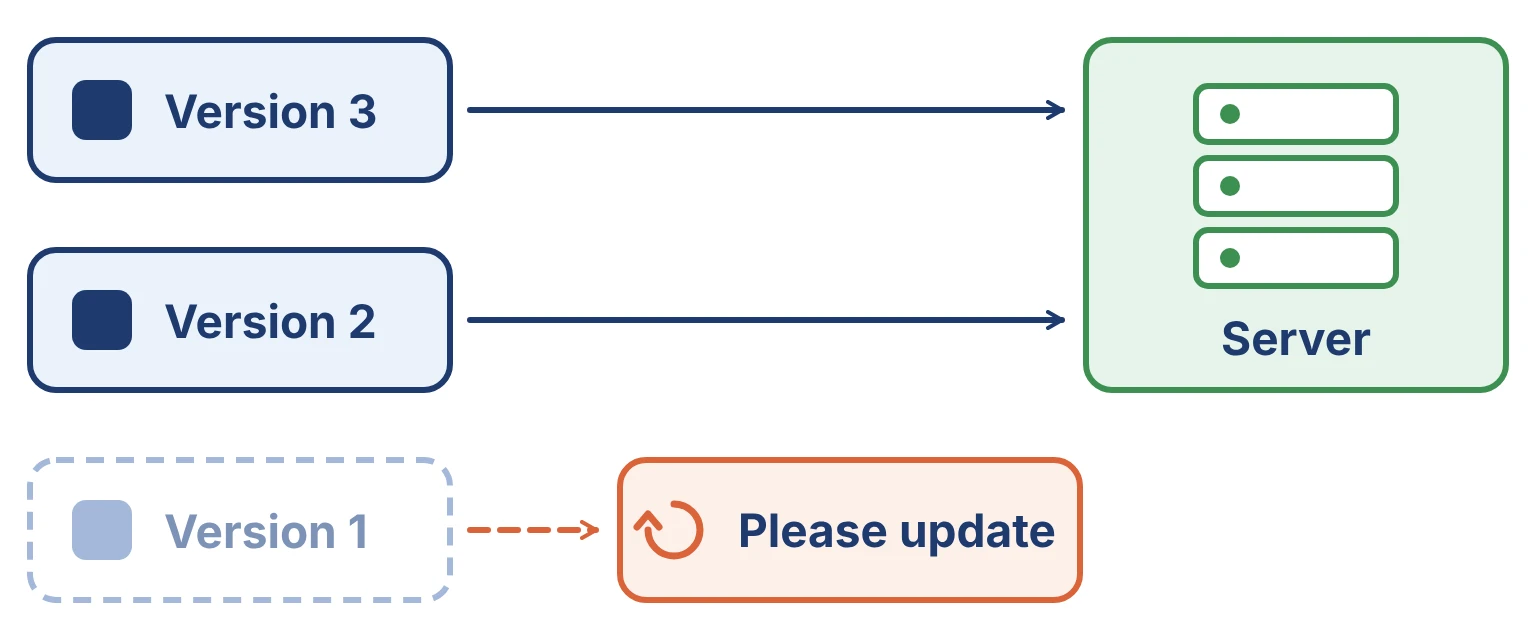
Say the company decides every walk needs a drop-off photo before it can end. If the server insists on it the day the new version ships, every walker still on the old version gets an error when they try to finish a walk, with a dog on the lead. Either the rule waits until nobody uses the old version, or the old version is told to update first.
The app sends its version number with every request.
The server accepts requests from the previous version for as long as you support it.
There's a minimum supported version, and anything below it opens a screen asking the person to update.
Removing or renaming data takes two releases: add the new field first, and retire the old one once nobody's app uses it.
When should the app ask for location, the camera and notifications?
At the moment the feature is needed, after a line saying why. After a refusal, an iPhone won't show the system prompt again and Android allows one more try at most; from then on the only way back is through the phone's settings. So a request on the first screen, before the person knows what the app does, can lose the permission for good. Plan what happens after a no, because some people will say it.
| Permission | When the app asks | If the answer is no |
|---|---|---|
| Location while walking | When a walker starts their first walk | The walk is logged with start and end times, and the app explains how to turn location on |
| Location in the background | After the first walk, with a line on why the route needs it while the phone is locked | The route only records while the app is open on screen |
| Camera | When a walker takes their first drop-off photo | They pick a photo they've already taken instead |
| Notifications | On the owner's phone, once their first walk is booked | The owner gets an email when their dog is home |
Background location gets the closest look from the stores. Apple and Google both expect the app to explain why it needs it, and Google Play asks for a declaration before it will publish an app that uses it. Write that explanation into the brief, not in the week of submission.
Where does a walk go when there's no signal?
Onto the phone first, then up to the server when it can. Parks, woods and riverside paths are exactly where the signal drops, so the brief should say that the app saves each walk and photo on the phone before it tries to upload anything.
Every walk and photo is saved on the phone before any upload starts.
Uploads retry by themselves, and a retry that lands after a success doesn't create a second walk.
The walker can see which walks haven't uploaded yet.
Closing the app, a flat battery or a restart mid-upload loses nothing that was saved.
The owner's notification goes out once the walk reaches the server, not when the walker presses Finish.
Test this in the first week of the build, on the walkers' own phones, in flight mode and on the routes they actually walk. It's the part of the app most likely to change the design, and the least likely to show up in a demo on office Wi-Fi.
Who holds the accounts that ship updates?
Your company should. A store only accepts an update from the developer account that published the app, so whoever holds the Apple and Google accounts, and the keys that sign each build, decides who can update it.
The Apple and Google developer accounts are in your company's name, opened before the build starts.
Your developer is invited to them as a team member rather than owning them.
Signing keys and push notification keys are kept somewhere you control, such as the company password manager.
The build service and crash reporting accounts are yours too. Crash reports are the only record of what went wrong on a phone you'll never hold.
Put a price on the checklist before you commit
Nearly every box above is build time, and much of it repeats for each platform. Our free MVP Cost Calculator turns eight questions about your app into a ballpark price and timeline, in development weeks and pounds. It counts native iOS and Android apps as a price driver of their own, and shows what the first release would cost without its biggest item. Price your app with the MVP Cost Calculator.
Our own builds are fixed price: £10,000 + VAT for a two week sprint or £20,000 + VAT for three, each ending with a week of changes from your feedback and followed by a handover week after launch, with the code and accounts in your name. Bring this checklist with your answers filled in to a free 30 minute discovery call, and we'll tell you plainly whether your first release fits a sprint and which route it should take. Book a discovery call.
Frequently asked questions
- Do I need both an iOS and an Android app at launch?
- Not if your first users mostly carry one kind of phone. Ask them, or check which phones visit your website. React Native and Flutter build both apps from one codebase, but each platform still has its own testing, store listing and review, so launching on one and adding the other later is a reasonable plan.
- Can I turn my website into a mobile app?
- Partly. A wrapper such as Capacitor puts a web app inside a store app, and it's the quickest way into the stores. Apple turns down apps that are only a website in a frame, so the wrapped app needs something the site can't do, such as notifications or the camera. Every item on this checklist still applies to it.