Guide
Building your own AI on a model you don't have to train
By Max Winter-Leinweber11 min read
In short
To build your own AI, you almost never train a model. You rent one from a provider such as OpenAI, Anthropic or Google and build everything around it: instructions that set the job, your own documents looked up for each question, actions it can take through your code, and the app people sign in to. That last part is most of the work, and it's ordinary software you own.
- What you train
- Usually nothing
- What you build
- Instructions, knowledge, tools and the app
- Worked example
- A garden room company's assistant
- Drawn from
- Building ReelEstate
What does it take to build your own AI?
Less than training a model, and more than writing a prompt. When a business says it wants its own AI, it nearly always means a tool that knows its products, follows its rules and works inside its systems. All of that can sit on top of a model someone else has trained, and the model is the one part you don't need to own.
There are four ways to end up with an AI you can call yours, and they differ enormously in what they take.
| Approach | What you end up with | Suits | What it takes |
|---|---|---|---|
| Train a model from scratch | A new model of your own | AI labs and large research teams | Vast amounts of data, specialist staff and months of computing time |
| Fine-tune an existing model | A provider's model, adjusted to answer in your format | A narrow, repetitive job with hundreds of good examples | A set of example answers, and repeating the work when the base model is retired |
| Run an open-weight model yourself | A published model such as Llama or Mistral on servers you control | Data that must not leave your own infrastructure | GPU servers and someone to keep them running |
| Build on a model through its API | Your instructions, knowledge, tools and app around a rented model | Nearly every product and business tool | A normal software build, plus a charge for each request |
The rest of this guide is about the last row, because that's where almost every AI product starts, ours included. It follows one example throughout: an assistant for a company that designs and installs garden rooms, answering the questions buyers ask before they book a site survey.
Write down the one job it does
Start from a job a person does today, not from the technology. At the garden room company, that's a salesperson answering the same twenty questions about sizes, insulation, electrics and lead times, mostly in the evening when nobody is in the office. The assistant's job is to answer those from the company's own information and get a site survey booked.
Before choosing a provider or a tool, write the job down in five lines:
Who asks. Someone who has found the website and is comparing two or three installers.
What they bring. A question in their own words, sometimes with a garden size or a postcode.
What a good answer contains. Facts from the company's spec sheets and price list, and nothing it had to guess.
What goes to a person. Planning permission, discounts, complaints and anything about an existing order.
How you'll know it works. The share of conversations that end with a survey booked and no member of staff involved.
The fourth line is the one people skip, and it's what keeps an AI tool out of trouble. Planning rules depend on the site, and a confident wrong answer about permission costs the company far more than a slow reply would. So the assistant says it can't answer that and passes the conversation to the office with the buyer's details already filled in.
Then go through the inbox and copy out thirty real questions, each with an answer you'd accept. They become the test every candidate model has to pass, and our AI software development guide explains how to run it and pick the cheapest model that does. How to choose a model for an AI feature.
How does an AI learn what your business knows?
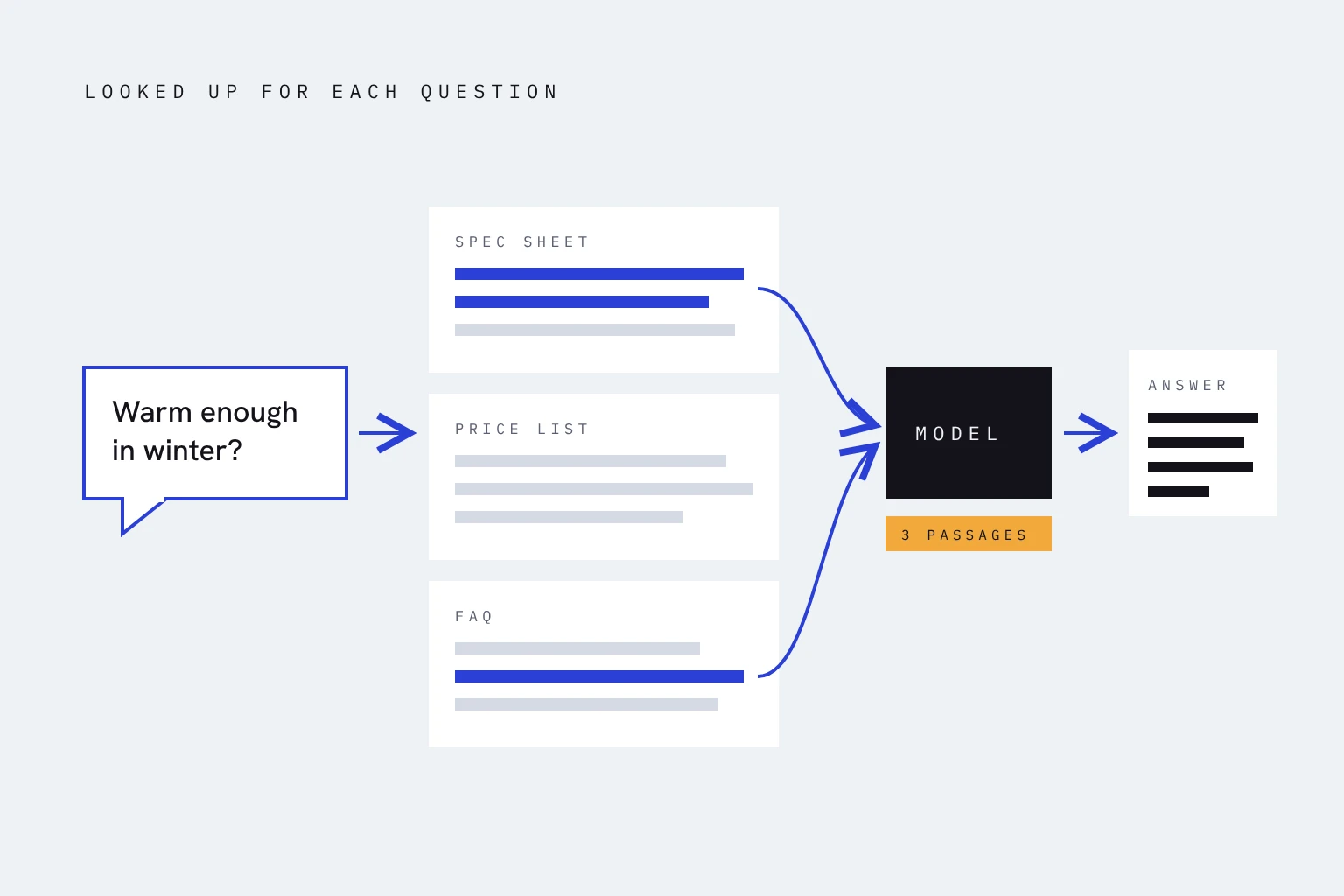
Mostly it doesn't learn it at all. The model reads your information afresh with every question, as part of what your app sends it. That's why you can change a price this afternoon and have the assistant quote the new one tonight, with nothing retrained.
Instructions set the job
The instructions, often called the system prompt, are a page of plain English sent with every request: who the assistant works for, what it may talk about, how it should sound and when to hand over. Write the five lines from the job above into them almost word for word. Keep them under version control like code, since one changed sentence alters every answer.
Documents are looked up for each question
If everything the assistant needs fits in a few dozen pages, send all of it with every question. Current models read long inputs comfortably, and it's the simplest thing that works. Once the material outgrows that, the app searches it first. Your documents are split into short passages, and each is stored with an embedding, a list of numbers that captures what the passage means. A buyer asking whether a room is warm enough in winter then finds the insulation spec even though none of the words match, and only the closest few passages go to the model, with an instruction to answer from them and say so when they don't cover the question.
Suppliers call this retrieval-augmented generation, or RAG. Its answers are only as good as the documents behind it. A price list in a scanned PDF and three versions of the spec sheet that disagree produce wrong answers whichever model reads them, so tidying the source material comes before any building.
Fine-tuning changes how it answers, not what it knows
Fine-tuning trains an existing model further on hundreds or thousands of example questions and answers. It's good at making replies follow a fixed format or tone, and at teaching a smaller, cheaper model one narrow job. It's a poor place to keep facts, because they're fixed at training time and a new price list means training again. Try it only after instructions and documents have failed to give consistent answers.
Whatever the app sends goes to the model provider with each request. Before customer details go anywhere near it, check where the provider processes data and how long it keeps it. What UK GDPR asks about where an app's data is kept.
Letting it take actions through your code
An assistant that only answers still leaves the buyer to pick up the phone. Tools let it finish the job. A tool is a function in your app that the model may ask to use, described to it in a sentence: check survey availability for a postcode, book a slot, email the brochure. The model replies with a request to run one, details filled in, and your code decides whether to run it.
That decision is the safeguard. The model never touches the booking system itself, so whether a request is allowed is settled in code you wrote and tested. A model can be talked into ignoring a sentence in its instructions; it can't get past a check on the server. Once an assistant chains several tools towards a goal, checking a date, booking it and sending the confirmation, it's what most people now call an AI agent, and the same rule holds for every step.
Start with tools that only read, such as checking availability or looking up a product, and add ones that change things once those behave
Have the buyer confirm before anything that books, charges or sends
Check in code, on every call, that this person may do what the tool is about to do
Log each tool call with what the model asked for and what your code did
Give the assistant a hand-over tool, so passing a question to the office is an action it takes rather than a dead end
The app around the model is most of the build
Expect the call to the model to be a few lines of code and the project to be everything around it. That's the part that separates a demo from something customers pay for, and it's yours outright: you can switch provider without touching it.
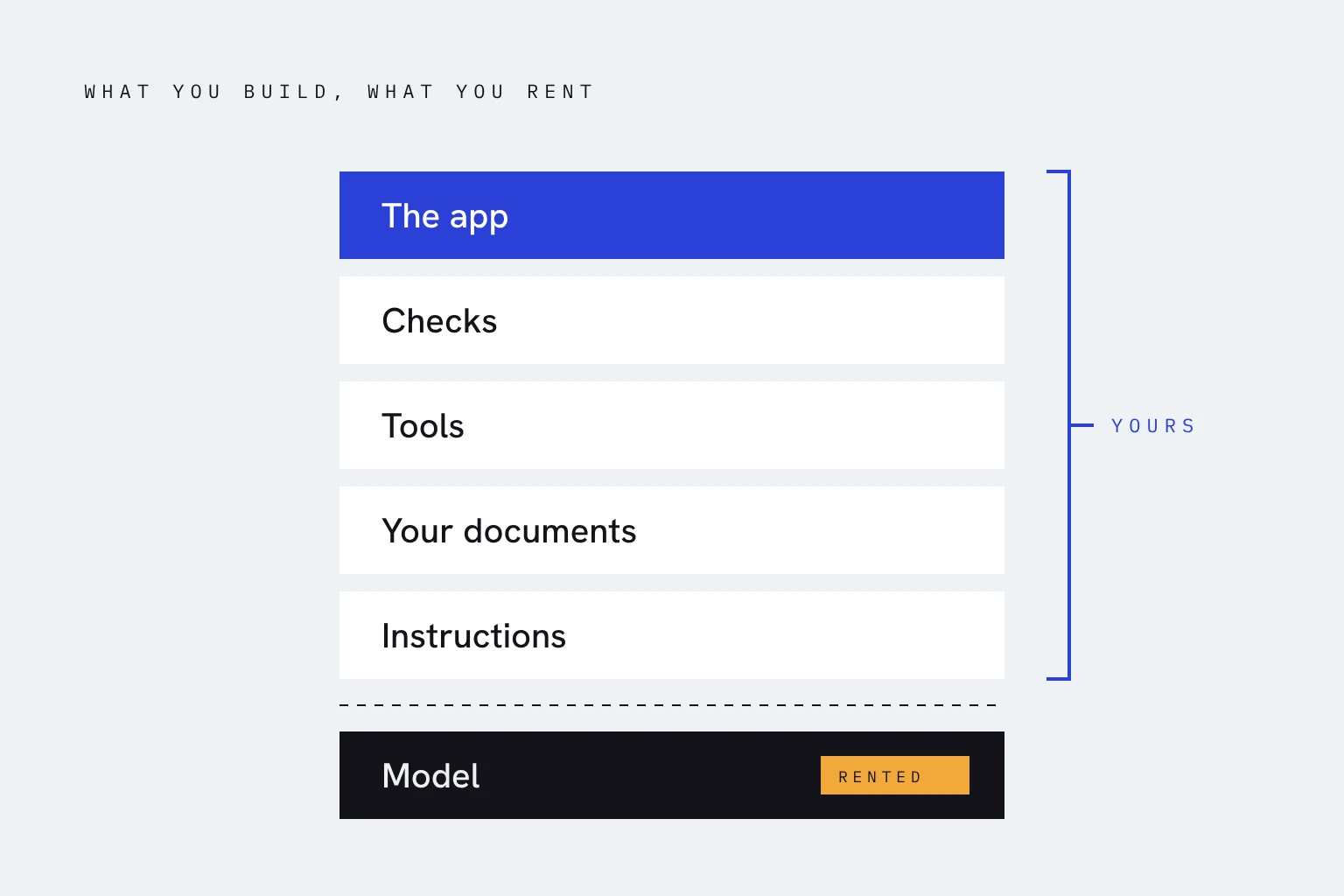
ReelEstate, which we built, shows the proportion. It turns estate agents' listing photos into property videos, and the AI step, a request to a video model on fal.ai, is the smallest part of it. The table puts what we built around that request next to what the garden room assistant needs in the same place.
| Part of the app | In ReelEstate | In the garden room assistant |
|---|---|---|
| Work that outlasts a page load | Each clip is a database row and a job on fal.ai, finished by a webhook or by the page polling, whichever comes first | Every conversation saved, so a buyer can come back to it and the office can read it |
| Not trusting what comes back | The result is fetched again with the app's own key rather than taken from the webhook, and every clip is checked for invented cuts | Any price in an answer checked against the price list before it's shown |
| Usage and billing | A credit taken in the same database statement that creates each clip, and refunded if the clip fails | A limit on messages per visitor, so a bot can't run up the model bill |
| The rules of the trade | Photo edits that add or remove objects labelled as virtually staged, as listing rules require | Planning questions handed to a person, every time |
| People and permissions | Team workspaces with roles and one shared credit balance | A sign-in for office staff and an inbox of handed-over conversations |
None of that is AI work in the sense people usually mean, and all of it had to exist before an estate agent could rely on the product. How we built ReelEstate.
Can you make your own AI without writing code?
Yes, for a tool your own team uses. Once customers sign in, pay or rely on the answers, it needs to be an app you control. The routes in between are worth knowing, because many AI projects start on one and move.
| Route | Examples | Suits | Where it tends to stop |
|---|---|---|---|
| Assistant builders | Custom GPTs in ChatGPT, Claude Projects | Staff asking questions of your own documents | People use it inside someone else's product, under their own account, so you control little around the answer |
| Workflow tools with AI steps | n8n, Make, Zapier | Back-office jobs such as sorting enquiries or drafting replies for a person to send | Anything customers use directly, or a workflow other businesses would pay for |
| AI app builders | Lovable, Bolt, Replit | A working first version of a customer-facing app | Access rules, secrets and checks on the model's output that nobody has reviewed |
| Code calling the provider's API | The OpenAI, Anthropic or Google SDKs in your own app | A product customers sign in to, pay for and depend on | It needs a developer to build and look after it |
For the garden room company, an assistant builder loaded with the spec sheets would help the sales team answer faster from tomorrow. The assistant on the website, which books surveys and hands conversations to the office, needs to be code.
If AI steps in Zapier, Make or n8n already do work your customers depend on, our self-assessment shows when that workflow should become a product of its own. Ten signs your automations should become a SaaS product.
A first version from an AI app builder is a reasonable start, provided someone checks it before real users arrive. Our production audit for AI-built apps.
If you're unsure which side of that line your idea falls, our free Build or No-Code Quiz asks seven questions about your idea, users and budget and tells you whether no-code is enough or you need real code. Take the Build or No-Code Quiz.
What does your own AI app cost to build and run?
It comes as two bills that behave differently. The build is a one-off, mostly spent on the app around the model, so it's priced like any other software of the same size. The model is charged per request for as long as the product runs, which is why usage limits and metering belong in the first release rather than a later one.
Our free MVP Cost Calculator asks eight questions about your app, including whether AI is one feature or the whole product, and gives a ballpark in development weeks and pounds. Estimate your AI app with the MVP Cost Calculator.
We build AI products as production code at a fixed price, from £7,500 + VAT, with the model provider account, the code and the hosting all in your company's name. See what a fixed-price sprint includes
Frequently asked questions
- Can I build my own AI like ChatGPT?
- Not the model behind it, unless you have a research lab's budget. You can build something that looks and behaves like ChatGPT for your own users, on the same kind of model through its API, with your instructions, your documents, your branding and your own sign-in.
- Will the AI provider train its models on my customers' data?
- Check the terms of the plan you use. The major providers say data sent through their paid APIs isn't used for training by default, which is different from the terms of free consumer chat apps. Put the API account in your company's name so those terms are agreed by you, not by whoever built the app.
- What happens when the provider retires the model?
- Providers retire older models on published schedules, and a newer one can answer the same instructions differently. Keep the model's name in one setting, run your test questions against the replacement before switching, and the change becomes an afternoon's check rather than a surprise.
- Is an AI assistant the same as a chatbot?
- Older chatbots followed scripted decision trees and could only give answers someone had written in advance. An AI assistant built on a language model answers in its own words from the information it's given, and with tools it can act. That flexibility is why it needs hand-over rules and checks that a script never did.