Migration guide · AI app builders
Firebase Studio migration before the March 2027 shutdown
By Max Winter-Leinweber9 min read
In short
Firebase Studio shuts down on 22 March 2027, and every workspace still in it is deleted that day. Your Firebase project is not: Firestore data, signed-up users and the published app keep running. So a Firebase Studio migration means getting the code, the .env file and your prompts out, then choosing where the app is built and published from. Download a copy this week, even if you move later.
- Shutdown
- 22 March 2027, workspaces deleted
- Code export
- Zip, GitHub or the Firebase CLI
- Keeps running
- Firestore, Auth and App Hosting
- Same URL
- Deploy to the backend named studio
What does the Firebase Studio shutdown delete?
The workspace, and only the workspace. Google announced the sunset on 19 March 2026, stopped new workspaces and sign-ups on 22 June 2026, and on 22 March 2027 will delete whatever is left, with no way to recover it. Firestore, Firebase Authentication and App Hosting sit in your Firebase project rather than in Studio, and Google says they carry on as normal.
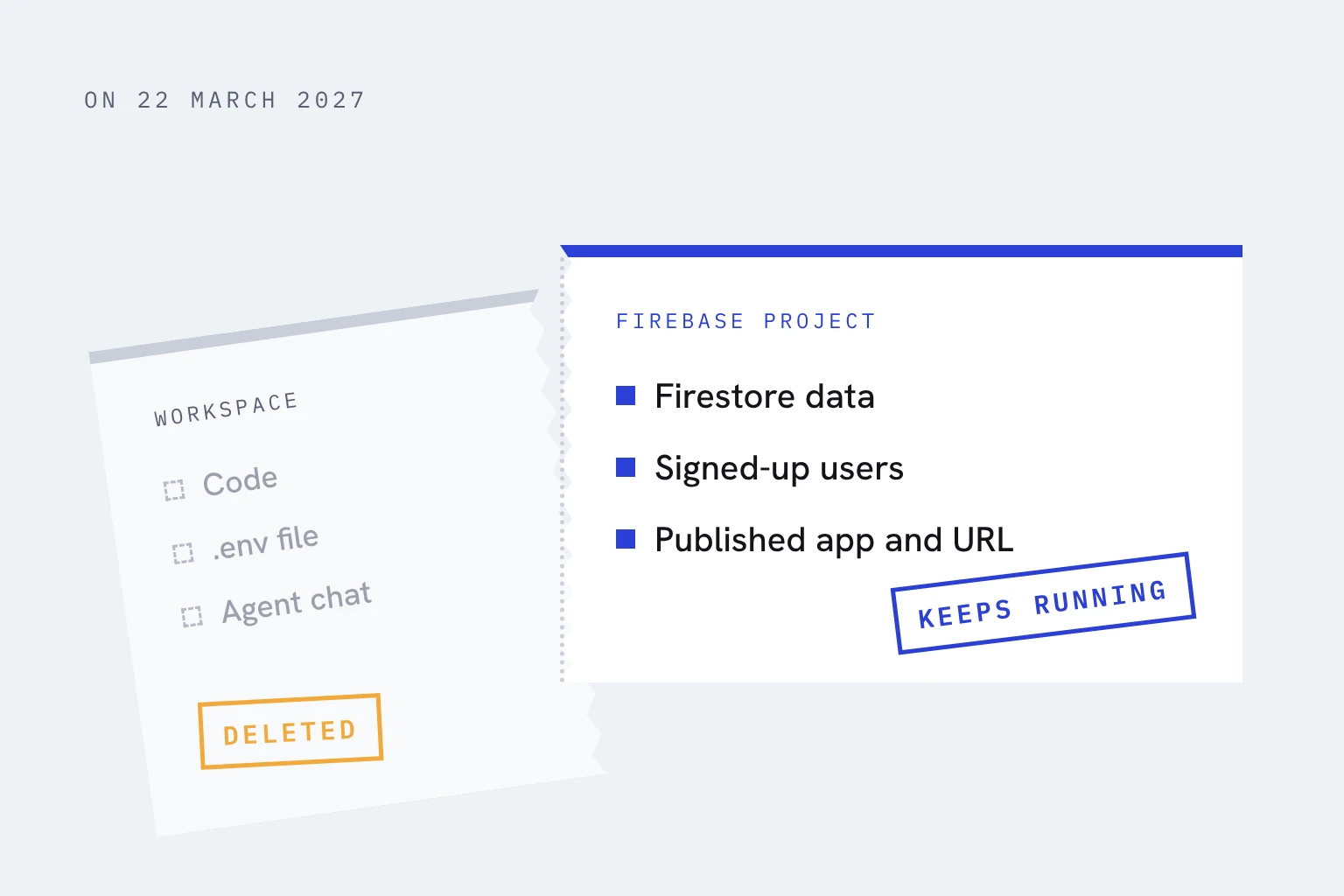
| Part of the app | Where it lives | On 22 March 2027 |
|---|---|---|
| Source code and git history | The workspace | Deleted unless you export it |
| The .env file with your Gemini API key | The workspace | Deleted. If you published, App Hosting holds its own copy of the key |
| Prompts and agent chat | The workspace, in /home/user/.idx/ai | Deleted, and not included in the standard zip |
| Firestore data | Your Firebase project | Keeps running |
| Users who signed up | Firebase Authentication | Keeps running |
| The published app and its URL | An App Hosting backend, usually named studio | Keeps serving the last version you published |
So your users won't notice anything on 22 March. What stops is your ability to change the app. A Studio app left behind keeps running until the day it needs a fix, and then there is no code to fix.
Take a full copy out this week
Export now, even if the real move waits until the new year. It takes minutes, and if a later step goes wrong you can start again from your own copy rather than from a workspace with a deadline on it.
Click Move now at the top of the workspace and choose Zip and Download. If nothing happens, allow pop-ups for the page, or run Firebase Studio: Zip & Download from the command palette.
Push the same code to a GitHub repository in your company's organisation, not a personal account, so there are two copies in two places.
Copy each value in .env into a password manager. Keep the file itself out of GitHub.
Download the agent chat: open the /home/user folder, right-click .idx/ai and choose Zip and Download, then cancel the prompt to rebuild the environment.
If the export stalls, delete node_modules, build folders and large media from the project and try again.
Don't skip the chat history. It's the only record of why the app works the way it does: which features you asked for, which you dropped and what the agent was told to work around. Anyone who changes the app next, whether that's you, a developer or a different agent, will want it. Prompts from the App Prototyping agent also show up in the project's git log.
Then prove the copy is complete by running it somewhere other than Studio. Until it has run elsewhere, you only hope it's complete. Why a backup only counts once you've restored it
Check whose Google account the app belongs to
Only the person who created a Firebase Studio workspace can use Move now. If a freelancer, a co-founder or a former employee built the app, the workspace, the Firebase project behind it and the Gemini API key may all sit in their Google account rather than your company's.
You can still export a shared workspace from the command palette, but Google points out that the copy keeps pointing at the original owner's Firebase project and keys. Starting a new project is the fallback, and it means moving users and data you'd otherwise keep where they are. Usually the better route is to ask the creator to push the code to your company's GitHub, and to add your company's Google account as an Owner under Project settings, then Users and permissions in the Firebase console. Check which Google Cloud project issued the Gemini key and which billing account pays for it while you're there.
This is the same question to settle with anyone who builds AI features for you: whose name are the accounts and keys in? What to ask an AI development company before it starts
Google AI Studio, Antigravity or your own repository
Pick by how the app will be changed from now on. Google offers two homes of its own: Google AI Studio for building in the browser by prompt, and Antigravity, a desktop editor built around coding agents. The third route is any repository and editor you choose, publishing to the same Firebase project.
| Route | Suits | Your URL | Watch for |
|---|---|---|---|
| Google AI Studio | Apps made with the App Prototyping agent that you'll keep changing by prompt | Kept if you publish to App Hosting through GitHub sync. The Publish button moves the app to Cloud Run and a new run.app address | You add the Gemini key to App Hosting yourself, and Google sign-in fails until the new domain is authorised |
| Antigravity | Apps you've grown in Code view, or started from a template or an imported repository | Kept: its agent deploys to your existing App Hosting backend | A desktop install, Node.js 20 or later and Firebase CLI 15.10.0 or later. The agent-led conversion spends AI tokens |
| Your own repository | A developer or team taking the app over, in whatever editor they use | Kept on App Hosting. A different host means a new address | Previews, deploys and environment setup are yours to run from now on |
For an app that already has customers, we'd take the third route, and keep using an AI agent to edit it if that suits you. Google AI Studio is another prompt-driven builder, and Google has just shown it will retire one of those. With the code in your own repository and deploys running from it, the next change of tool is a change of editor rather than another migration.
If you're going to Antigravity, the CLI route does the conversion without the agent: npx firebase-tools@latest studio:export followed by the path to your project. Google says the command is tuned for Next.js, Flutter and Angular workspaces and may miss parts of others, so check the result builds before you rely on it.
Keep the URL, the Gemini key and Google sign-in working
Deploy to the App Hosting backend Studio created and nothing changes for your users. Install the Firebase CLI, run firebase init apphosting in the project folder, choose Link to an existing backend, pick the backend named studio, then run firebase deploy. Your *.hosted.app address and any custom domain stay as they were.
When Studio published your app, it quietly copied the Gemini API key from .env into an App Hosting environment variable. Once you deploy from GitHub instead, set that variable yourself under the backend's Settings, then Environment. Anyone with access to the Firebase project can read it there, so if several people do, put the key in Secret Manager instead. In the Google Cloud console, restrict the key to the Gemini API, and if .env was ever committed to a repository, create a new key and delete the old one.
Accounts don't move at all, because Firebase Authentication stays in the same project. Nobody signs up again or resets a password. The one catch is Google sign-in on a new address: add the domain under Authentication, Settings, Authorized domains before you switch, or the sign-in popup fails.
Staying on Firebase after Studio is a reasonable choice for most apps. If you're weighing a move off Firestore at the same time, compare the two before adding a database migration to a deadline that doesn't need one. Supabase vs Firebase for a startup
What a Studio prototype still needs before it carries customers
Moving the app changes where it's built, not how safe it is. Studio was a preview for prototypes, and a prototype's gaps travel with it. Our free App Launch Checklist builds the legal, payment and analytics list for your launch, but check these four before any of that. Make a launch list with the App Launch Checklist
Open the Firestore security rules. A database created in test mode lets anyone read and write everything for 30 days, then refuses every request, and neither suits customers. Write a rule for each collection and test it signed in as two different users.
Check the Gemini key is only read in server code. In a Next.js app, any variable whose name starts with NEXT_PUBLIC_ is copied into the browser.
Set a budget alert on the billing account, so a loop calling Gemini shows up as an email rather than an invoice.
Give development its own Firebase project. If the workspace and the published app share one project, every test you run writes to the live database.
Our production audit for vibe-coded apps covers the rest, from secrets to rollbacks, in the order problems tend to surface. Run the production audit for vibe-coded apps
Plan your Firebase Studio migration backwards from 22 March
Aim to finish by the end of February. The steps are short, but each one can stall for reasons outside your control: a pop-up blocker on the export, a conversion that misses files, a former contractor slow to hand over a Google account. A month's margin absorbs all of them.
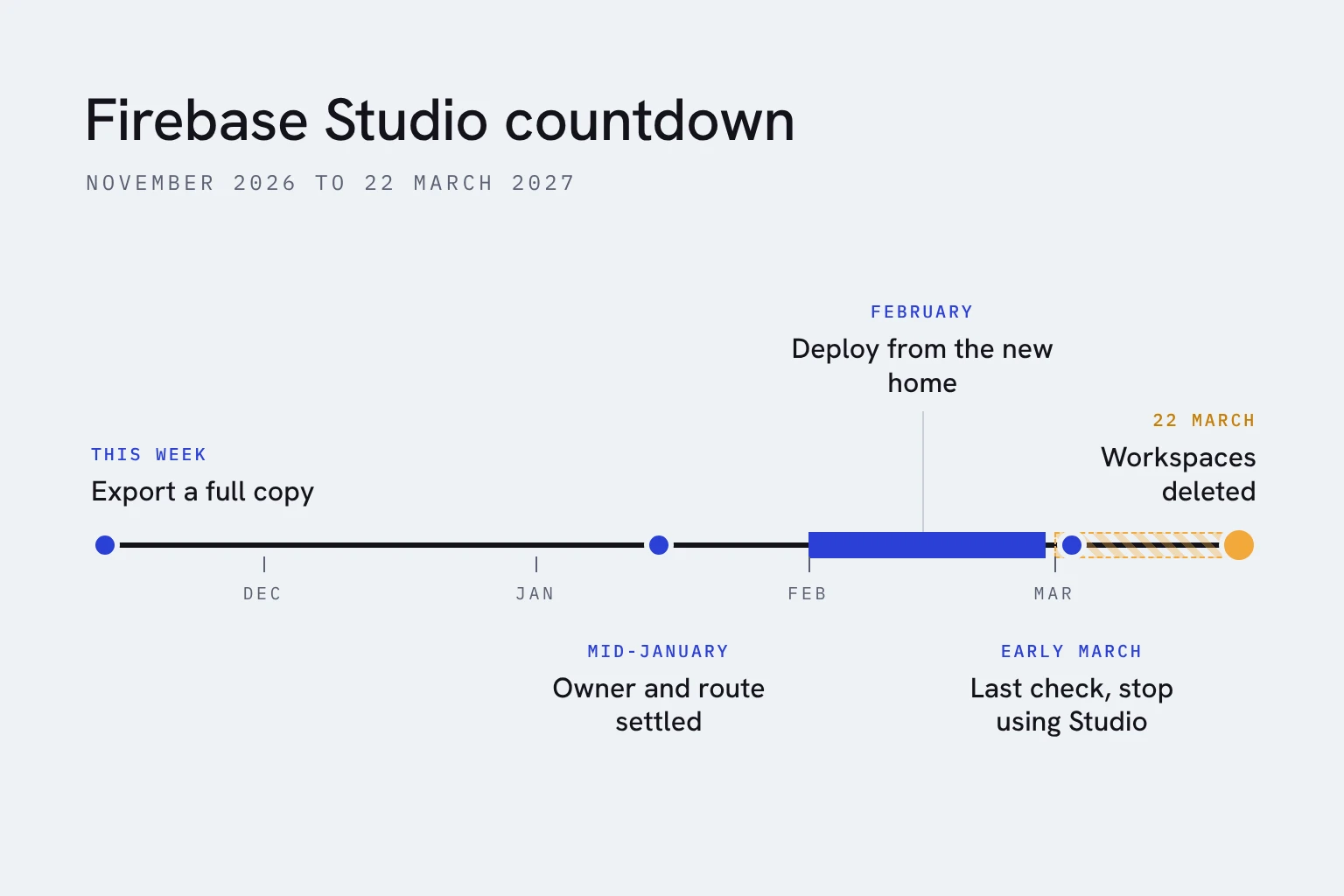
This week. Zip, GitHub copy, chat history and .env values saved, as above.
By mid-January. Ownership settled, route chosen, and the app running from your copy on your own machine or a test address.
February. Publish from the new setup to the studio backend. Check sign-in, a Gemini call and a Firestore write on the live app, and leave the Studio workspace untouched as a fallback.
Early March. Take one last zip and compare it with the repository, so you know Studio holds nothing you lack. Then stop working there.
If you'd rather hand it over, we move Studio apps into a repository you own, keep the URL and the users, and set up deploys from there, usually within one of our fixed-price sprints. See what a fixed-price sprint includes
Frequently asked questions
- What was Project IDX?
- Firebase Studio's earlier name. Google folded Project IDX into Firebase Studio in April 2025, which is why workspace settings and the agent's chat history sit in a folder called .idx. Old IDX workspaces are Firebase Studio workspaces and are deleted on the same date.
- Can I host a Firebase Studio app on Vercel or another provider?
- Yes. The exported project is a standard web app, and Firestore and Firebase Authentication work the same from any host. You get a new address, so set the Gemini key in the new host's environment variables and add the domain to Firebase Authentication's authorised domains before switching any links.
- Does the shutdown affect Firebase Hosting or Cloud Functions?
- No. Google says the sunset covers only the Firebase Studio development environment. Firebase services such as Cloud Firestore, Authentication and App Hosting keep working, along with anything else running in your Firebase project.