Guide
Build a web app that does one useful job well
To build a web app, decide the one task it has to complete, pick a way of building it you can keep running, connect the screens to your rules and data, then test the awkward cases before a small launch. This guide works through each step with a single example, for founders with or without a technical background.
By Max Winter-Leinweber7 min read
- Written for
- Founders, technical or not
- Build routes compared
- 3
- Worked example
- A tutor booking app
What should the first version of your web app do?
It should let one kind of user finish one task from start to end. Take a booking app for independent tutors. A parent picks a tutor, finds a free slot and books it, and the tutor sees the booking. That is a complete task. A calendar screen by itself is just a screen.
Your first release needs that whole journey working. It does not need a little of every feature you might want one day.
Turn the idea into a brief someone can build
Before you look at tools, write these down, in this order:
Name the first user. Be specific. For the tutor app, that means parents booking lessons, not everyone in education.
Define the result. What can that person finish? Here, a confirmed lesson with a tutor at a time the tutor has free.
Map the shortest journey. Browse tutors, pick a slot, enter details, confirm. Include what the tutor needs to see afterwards.
Set the rules. Can two parents book the same slot? Who can cancel, and how late? What happens to existing bookings when a tutor changes their availability?
Split essentials from later ideas. Keep whatever the booking needs to work. Loyalty points, referral schemes and detailed analytics can wait until someone asks for them.
The rules matter more than a long list of screens, because that is where the hard work hides. Finding them on paper costs far less than finding them after someone has spent a week polishing buttons.
Then write a few acceptance checks in plain English, such as "once a slot is booked, no other parent can book it". They give you, and whoever builds the app, the same definition of working.
Should you code it, use a builder or hire a developer?
Pick the route you can keep running after launch. How quickly a tool produces the first screen matters much less than whether it can handle your rules, and who will look after the app once people rely on it.
| Route | Useful when | What you are responsible for |
|---|---|---|
| Write the code yourself | You can develop and debug | The build, security and deployment |
| No-code or AI builder | Your workflow fits what the tool can do | Checking its limits and what the generated app actually does |
| Hire a developer | You need someone to build it for you | Agreeing the scope and reviewing progress |
With a builder, check permissions and data export, and make sure your essential rules are possible, before you commit. When you hire someone, ask who will own the code repository and the service accounts. If you are writing it yourself, choose tools you understand well enough to fix on a bad day over whatever is newest.
A responsive web app runs in the browser on phones, tablets and desktops. If your idea relies on phone features a browser can't reach, or you need to be in the app stores, read our guide on whether to build a web app or a mobile app first before you commit to either.
What happens between a click and a saved record?
Three parts work together every time someone presses a button: the interface collects the request, the server checks it against your rules, and the database stores the result. A booking button does not make a booking on its own.
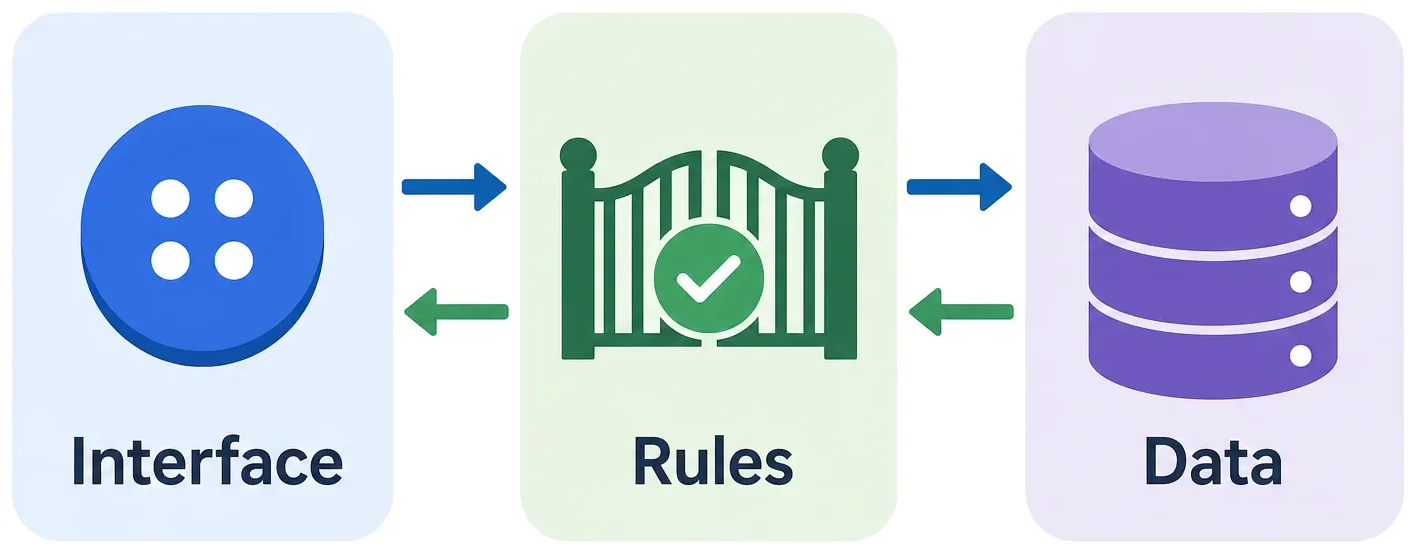
The interface collects the request
The front end is everything in the browser: pages, forms, buttons and messages. It should make the next step obvious and show when something is loading, has worked or has failed. If a booking fails, the parent needs to know whether to try again. A button that spins forever tells them nothing.
The server checks the rules
The back end receives each request and decides whether it is allowed. Is the slot still free? Is this user allowed to book it? Hiding an admin button in the interface protects nothing, because anyone can send a request to the server directly. The server itself has to refuse anything the user is not allowed to do.
The database keeps the record
The database stores tutors, availability and bookings, and how they relate: every booking belongs to one tutor and one time slot. The booking step also has to stop two parents who click at the same moment from both getting the slot.
These are three jobs, not necessarily three separate services. A full-stack framework or a managed platform can handle several of them at once. What matters is that you know where each job is done.
You also need hosting to put the app online and, depending on the task, sign-in, email or payments. Keep secret keys out of any code that runs in the browser, and take payments through an established provider instead of handling card details yourself.
What should you test before launching a web app?
Test the awkward cases, not just the journey where everything goes right. Try booking a slot someone has just taken, sending a half-filled form and opening another user's booking link. Ten minutes on these tells you more than another click through the homepage.
Before you release, check:
Access. Users can only see and change the records they are allowed to.
Failures. Slow connections, failed payments and double clicks do not create duplicate or misleading records.
Usability. The main task works on a small screen, with a keyboard, and with every field clearly labelled.
Recovery. You know how errors reach you and how you would restore lost data.
Put changes on a separate test environment before they reach the live app, and keep test data and credentials apart from production. Collect only the personal data you need, and before real users arrive, decide how long you keep it and how someone can ask for it to be deleted.
Then ask a handful of the people you built it for to complete the task without help. Watch where they hesitate or go wrong, and ask what they expected to happen. Whatever tripped them up is your next change.
What if building the app is not your job?
If you can explain the task but can't build it, we can. Scryptic builds and launches web apps and SaaS MVPs for UK founders who don't have an in-house development team, at a fixed price.
| Package | Fixed price | Sprint | After launch |
|---|---|---|---|
| MVP | £10,000 + VAT | 2 weeks: 1 of development, 1 of changes from your feedback | 1 week of bug fixes and support |
| Extended MVP | £20,000 + VAT | 3 weeks: 2 of development, 1 of changes from your feedback | 1 week of bug fixes and support |
We agree the scope and price before building starts, then go through progress and priorities on a call every Friday. The code lives in your repository and the service accounts are in your name, and both are handed over at launch.
Bring your workflow, and any prototype you already have, to a free 30 minute discovery call. We will talk through the scope, the tech stack and which package fits.
Frequently asked questions
- Can I build a web app without coding?
- Yes. No-code and AI builders can put an app together without you writing it line by line. You still need to check permissions, how data is handled and what happens when things go wrong, because a tool that can generate a screen has not proved the workflow behind it is safe or complete.
- Do I need a database for a web app?
- Not always. A calculator that works out an answer without saving anything may not need one. An app that remembers accounts, bookings or shared records needs somewhere permanent to keep them, with rules about who can read and change each record.
- Can I keep a prototype I have already built?
- Often, at least in part. Review the code, hosting and data before deciding what to keep. We review existing work during discovery, then either improve an app built with a no-code or AI tool or rebuild it and bring the data and users across. Either way, moving data and users takes planning.