Guide
ReactJS web development company hiring mistakes
The costliest mistake when hiring a ReactJS web development company is assuming React covers the whole product. React builds the screens people use in the browser; sign-in, the database, the rules about who can see what and the hosting are separate work, and each needs a named owner in the proposal. The other five mistakes below grow from the same blind spot.
By Max Winter-Leinweber8 min read
- Mistakes covered
- 6
- What React builds
- The interface
- Quickest check
- View the page source
Treating a ReactJS web development company as a full product team
React is a JavaScript library for building user interfaces. A company that lists React as its speciality has told you how it builds screens, but not who stores the data, who checks what each user is allowed to do or who puts the app online. Those are the parts that decide whether a product is safe to launch.
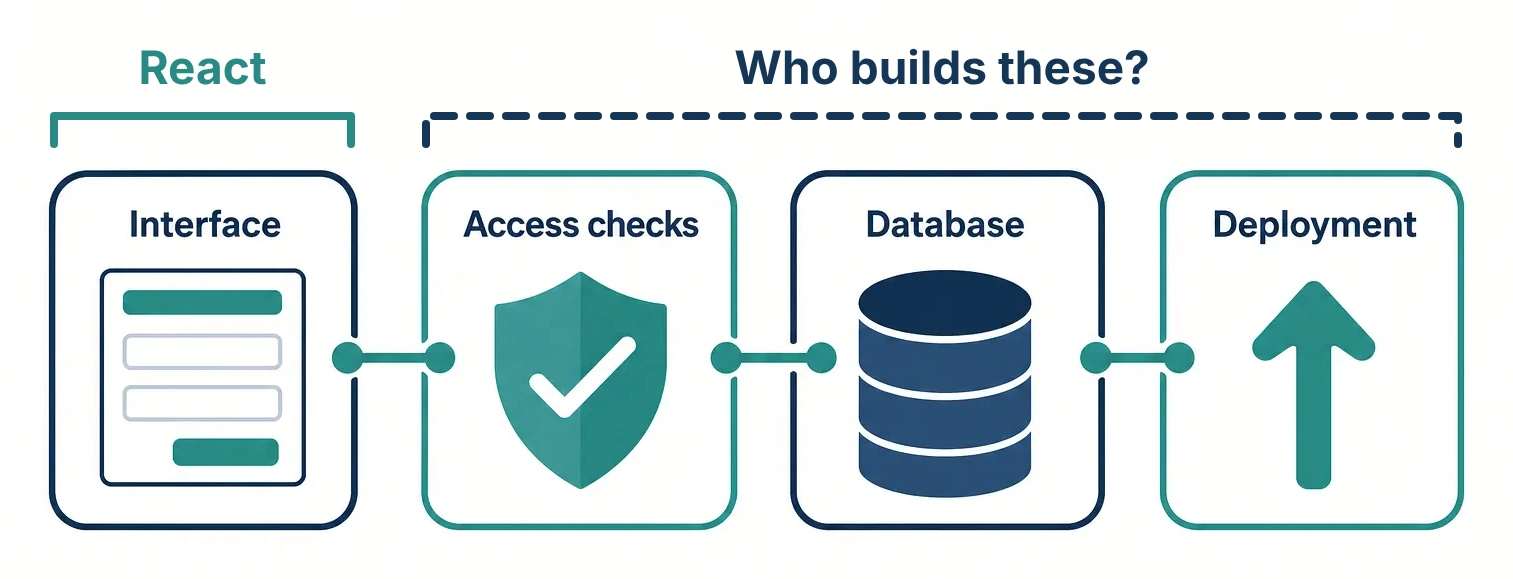
A portfolio of React work can't show you the difference. A demo where every button responds might be running on sample data, with permissions that exist only as buttons hidden from some users. See how the interface, server and database split the work.
Ask them to trace one action from click to database
Pick one action from your product and ask each company to walk you through it. Take an invoice approval tool: a supplier uploads an invoice, a manager approves it and the finance team sees it marked ready to pay. The React part is the upload form, the approve button and the status label. Everything else in that sentence happens on a server.
What does the supplier have to enter, and what happens when they upload the wrong kind of file?
Where is the invoice saved, and what stops one supplier opening another supplier's invoices?
What makes sure the person pressing approve is a manager, other than the button being hidden from everyone else?
How does a change reach the live app, and how would anyone notice an upload that failed?
You don't need to follow every technical word of the answers. Listen for names against each step, and for whether that step is in the quote. A React specialist is the right hire when you already have backend developers and someone running deployments. If you have neither, you are hiring for the whole release, and the proposal should say so line by line.
Accepting "we build in React" as a full answer
"React" on a proposal can describe very different projects, and the difference shows up later, when you want the app found in search or in the app stores. Ask which of these you are getting and why it suits your product.
| On the proposal | What it is | Suits | Ask about |
|---|---|---|---|
| React with Vite | A single-page app that builds each screen in the visitor's browser | Dashboards and tools behind a login | How the public pages will be found in search |
| Next.js | A React framework that can render pages on the server and run server code | Products with public pages as well as a signed-in app | Where the server code runs, and whose hosting account it sits in |
| React Native | React for iOS and Android apps rather than websites | Products that have to be in the app stores | Apps they have released to the stores, since web work doesn't cover that |
| Create React App | An older starter the React team stopped recommending for new apps in 2025 | Keeping an existing app running | Why a new project would start on it |
If the only reason given is "it's what we use", ask again. The choice should follow from your product: whether strangers need to find its pages, whether it has to live on a phone, and what code you already have.
Letting public pages render only in the browser
If people should find your product through Google or an AI assistant, its public pages need their text in the HTML the server sends. A React single-page app sends an almost empty page and a bundle of JavaScript, then builds the content in the browser. Google runs that JavaScript eventually, but most AI crawlers don't, so to them the page is blank.
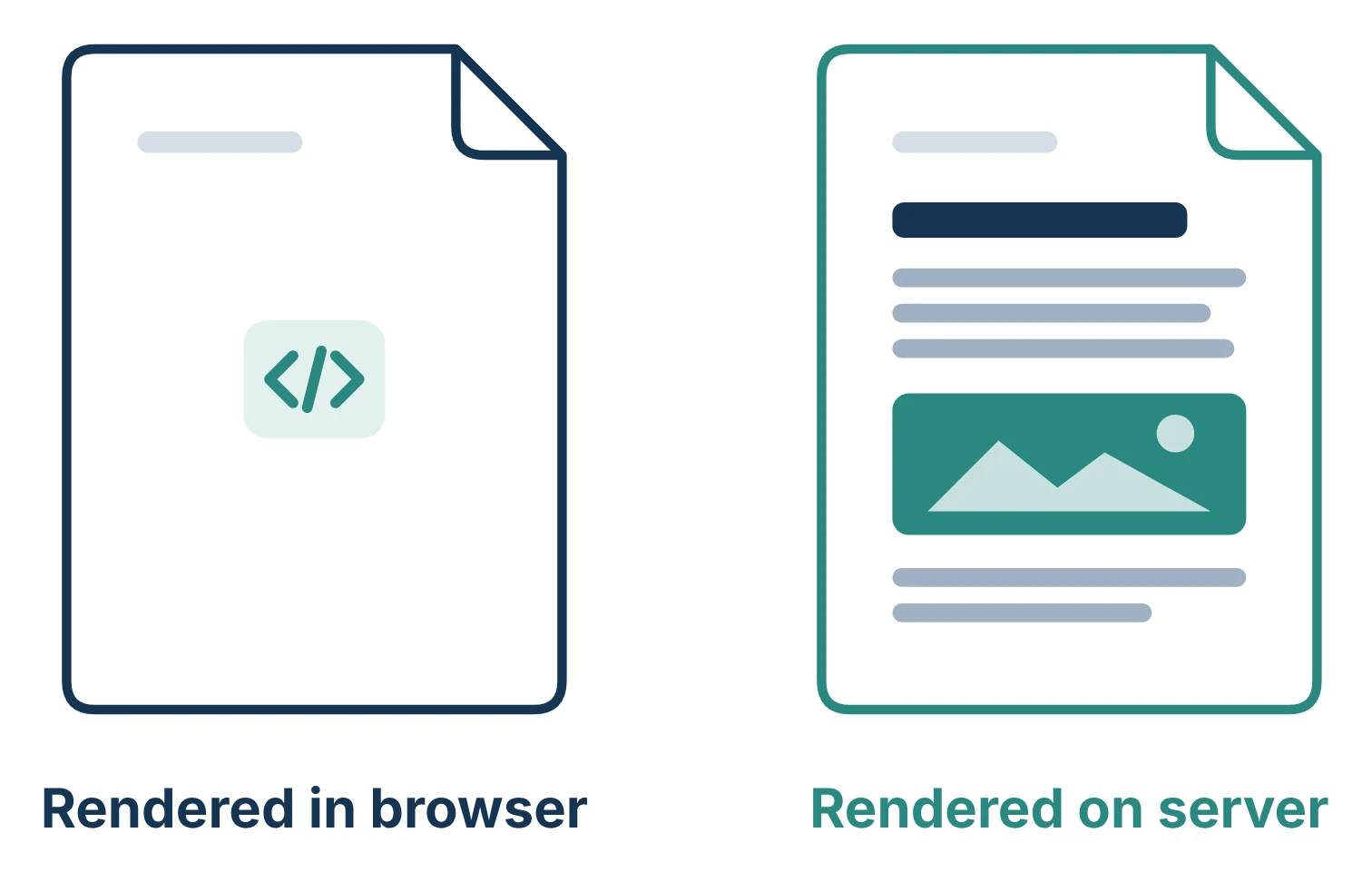
Screens behind a login can safely be built in the browser, because no crawler sees them anyway. Landing pages, pricing, listings and articles can't. Ask how those pages will be rendered, on the server or generated ahead of time, and get the answer before you sign rather than after launch.
You can test this on any site, including the past work of the companies on your shortlist. Open a page, view its source, and look for a sentence you can see on screen. If it isn't there, the page was built in the browser. Our free Agent Readiness Check runs the same test for you and reports whether ChatGPT, Claude and other AI agents can find, read and use the site. Run the Agent Readiness Check on a site.
Paying to rewrite React code you already have
If you built a prototype with Lovable, Bolt, v0 or Base44, you already have a React interface. Lovable and most Bolt apps are React with Vite, v0 writes Next.js, and Base44 exports its React frontend. A quote to rebuild that from scratch in React is an offer to replace React with React.
Sometimes a rewrite is still the right call, but it should come out of a code review, not the first sales call. What generated apps tend to lack sits behind the screens: security rules on the database, secret keys kept out of the browser, tests and a repeatable deployment. Base44 is the exception to know about. Its exported screens still call Base44's own backend, so keeping them means building a backend you own behind them.
Ask each company what it would keep, what it would replace and why. A good answer names specific screens and tables; a vague one says the code "isn't production quality" and stops there. Run our production audit on your vibe-coded app.
Getting quotes priced by the screen
A quote built from a list of screens prices the part React builds and guesses at the rest. In the invoice tool, "approve invoice" is one button on one screen. It also raises questions a screen count never asks. Can a manager approve their own invoice? What happens to an approval when someone edits the amount afterwards? Who gets told?
Before you ask for prices, list the features you want and decide which ones the first release can't work without. Our free MVP Scope Planner helps with that: you list your features, size each one and see what fits a one week build and what can wait. Plan your first release with the MVP Scope Planner.
Then write down the rules for the features that made the cut, and send every company the same page. Two quotes for "invoice approval" only compare if both answer the same questions.
Leaving the app in the agency's accounts
Deploying a React app takes minutes, which makes it easy for a company to put yours on its own hosting account during the build and promise to move it later. Ask for the hosting project, the database and the domain to be registered to your business from the first deploy, with the company invited as users. Moving a live app between accounts after launch is slower and riskier than starting in the right place.
The contract matters as much as the accounts. In the UK, paying for code doesn't make it yours unless a written agreement assigns it to you. What to check in the contract before you sign.
Where Scryptic fits
We build the whole release rather than the React layer alone: the interface, the server, the database, sign-in and hosting, mostly with Next.js and Postgres. You work directly with the founder, who writes the code. The code lives in your repository, and the hosting, database and payment accounts are registered to you and handed over at launch.
If you already have backend developers and only need extra hands on the interface, a React contractor will suit you better than we will. If you need the whole thing built, bring your idea and any prototype to a call and we'll tell you what is worth keeping and whether it fits a sprint. Book a free 30 minute discovery call.
Frequently asked questions
- Is ReactJS the same as React?
- Yes. ReactJS and React.js are older names for the same library, which its maintainers simply call React. You'll see all three on agency websites and job adverts, and they mean the same thing.
- How much does a ReactJS web development company charge?
- It depends on how much of the product the company builds, not on React itself, so compare what each quote covers before you compare totals. Ours are fixed prices: £10,000 + VAT for a two week sprint, or £20,000 + VAT for a three week sprint, each followed by a handover week after launch.
- Who keeps a React app up to date after launch?
- Agree that before launch. React and the libraries around it release updates and security fixes, and someone has to apply them, whether that is a retainer, a freelancer or your own developer. Our handover week covers bug fixes straight after launch; after that the code is in your repository, so any React developer can pick it up.