Migration guide · No-code app builders
Knack migration without losing records, roles or files
By Max Winter-Leinweber8 min read
In short
A Knack migration means rebuilding the app, because Knack has no code export, while records, connections and files come out through its API. Export through the API rather than CSV so every record keeps its ID, merge the user role tables into one users table with roles, and plan for everyone to set a new password. Most Knack apps take three to six weeks to rebuild and switch over.
- Code export
- None, pages and rules are rebuilt
- Data export
- The API with record IDs, or CSV
- Users
- Role tables move, passwords don't
- Typical timeline
- 3 to 6 weeks
Why leave Knack when users are unlimited?
Not for seat costs, which push people off most no-code builders. Knack includes unlimited app users on every plan, so a portal for hundreds of clients costs the same as one for ten. Teams leave when the app has become the business and the platform starts deciding what it can do.
Records and API calls are capped by plan. Records over the limit are added and billed automatically, and one daily API allowance is shared by every integration, script and website form that talks to the app.
Custom JavaScript has piled up. Knack lets you add JavaScript and CSS to the whole app, and years of fixes there are code with no tests, no review and no history beyond what someone saved.
The product needs things a database app wasn't built for: billing per customer, separate organisations with their own admins, an app store listing, or changes tested before customers see them.
Pages slow down as tables grow, especially ones with formula fields that total connected records.
If Knack runs an internal process well and stays inside its plan, keep it. Someone without a developer can change it in minutes, and none of what follows is worth doing for a system that isn't straining.
Export through the API, not the CSV
The API gives every record its ID and every connection as a list of IDs, which is what an import needs to rebuild links. A CSV export from the Builder writes connections as display names instead, so two clients both called Smith Ltd can no longer be told apart.
Request each table's records through the object-based API, up to 1,000 a page. Read the raw version of each field, which Knack returns next to the formatted one: a connection's raw value lists the ID and display name of every connected record, and raw dates and numbers are easier to parse than the text shown on a page.
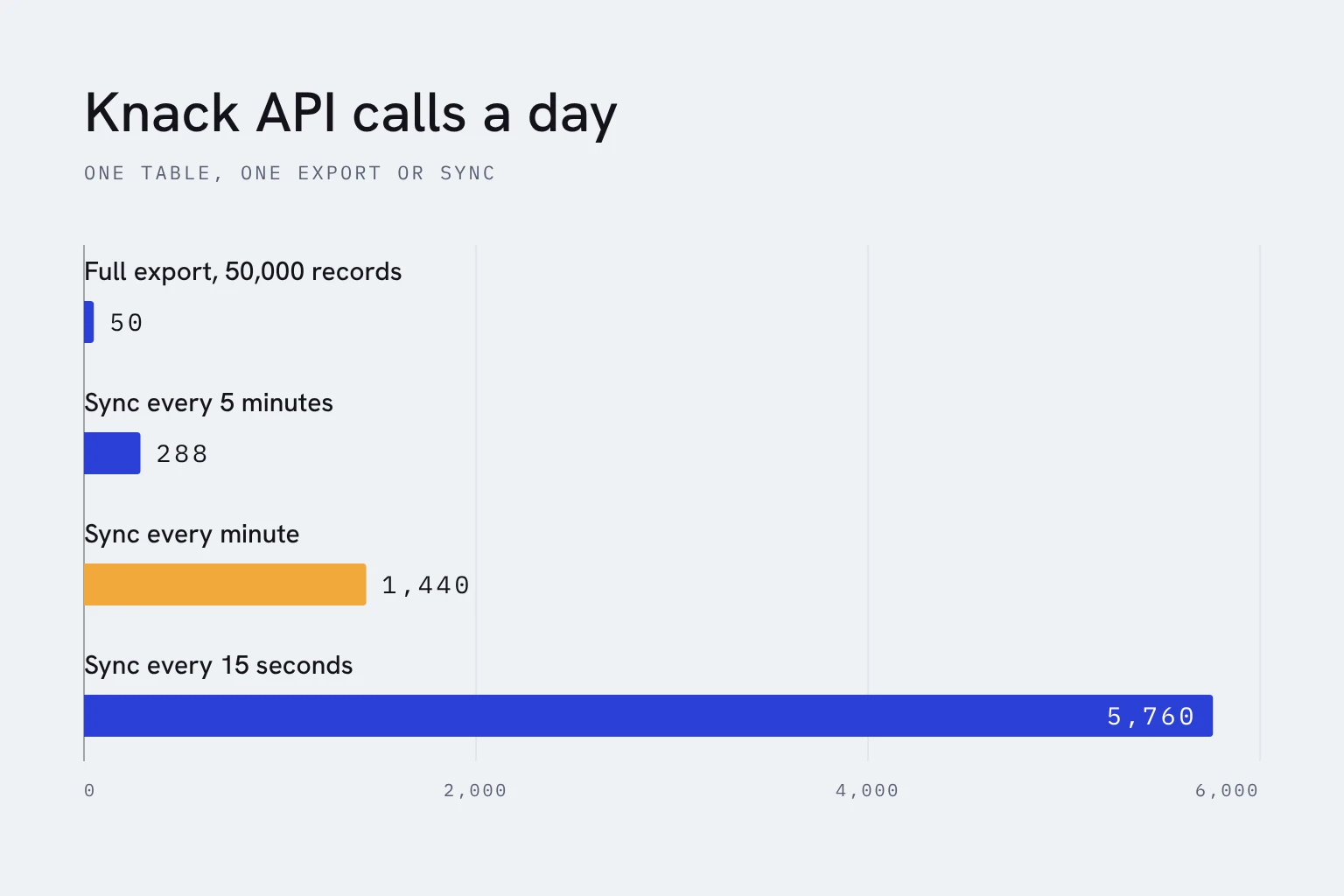
Knack caps calls twice: ten a second on every plan, and a daily total that depends on your plan. A full export barely touches either, since 50,000 records at 1,000 a page is 50 calls. What uses up the allowance is anything that polls. A sync checking one table every five minutes spends 288 calls a day before it does any work, every minute 1,440, and every 15 seconds 5,760.
Run the export from a script on your own machine or server. The API key opens every table, so it never belongs in browser code. If it has ever sat in the app's custom JavaScript, treat it as public and regenerate it.
Keep each record's Knack ID in a column on its new table. Import the rows first, then resolve connections in a second pass by matching IDs. The two-pass import, explained in our Airtable guide
Knack connections, formulas and fields in Postgres
Knack has done part of the design already. Every connection states whether each side links to one record or many, so the cardinality you'd have to guess from other tools is written in its settings.
Connections. One to many becomes a foreign key on the many side. Many to many becomes a join table with a unique constraint on the pair.
Equation and formula fields. Equations work inside one record, so most become generated columns, apart from date maths against today, which runs in the query. Formula fields sum, count or average connected records, so they become views.
Name and address fields. Each holds several parts, such as first and last name, or street, city and postcode. Give every part its own column, because searching and sorting need them separately.
Auto increment. Carry the numbers across if invoices or job sheets quote them, then continue the sequence from the highest.
File and image fields. Download each file from the URL the API returns, upload it to storage you own, and record which record it belongs to.
Multiple choice. A single choice becomes a check constraint or a lookup table. Several choices become a join table if anyone filters by them.
Conditional rules on fields, which set a value when a condition is met, are logic too. List them table by table next to the formulas, because none of them shows up in an export.
User roles are tables, and passwords stay behind
Knack stores each user role as its own table, and a person with two roles has a record in each. In the new app they become one users table, a roles table and a join between them, with fields that only one role has, such as a client's company, moved to a profile table.
Knack encrypts passwords as soon as they're saved, so they can't be exported. Import names, emails and roles, tell users a few days ahead that a sign-in email is coming, then send each one a link to set a password or sign in by magic link.
Permissions need the most care. Knack limits pages to roles in their login settings, then narrows records with data source filters such as records connected to the logged-in user. Write each rule in plain words, rebuild it as a check on the server and test it signed in as each role. This is where a rushed rebuild leaks: one forgotten filter, and a client can open another client's jobs.
Rules, tasks and custom JavaScript
Everything Knack does without being asked becomes server code. None of it exports, so open each form and table in the Builder and write down what it does.
| Knack feature | Rebuilt as |
|---|---|
| Record rules on a form | Server code that updates the record or connected records in one transaction |
| Email rules | Jobs that send templated emails through a provider, from your own domain |
| Tasks | Scheduled jobs with logging and alerts |
| Conditional rules on fields | Column defaults, triggers or checks on the server |
| Page and display rules | Conditions in the page components |
| Custom JavaScript and CSS | Code in the repository, reviewed and tested |
| Embed code on your website | The app at its own address, linked from the site |
Read the custom JavaScript line by line. It's where the real workarounds tend to live: fields hidden from some roles, calls to other services, sums Knack couldn't do. Each one is a requirement nobody wrote down.
Rules and pages that nobody uses any more don't need rebuilding. Our free MVP Scope Planner lets you list features, size each one and see what fits a first release and what can wait. Sort the rebuild with the MVP Scope Planner
Switching over in one evening
Knack keeps the data inside Knack, so the old and new apps can't share it during testing the way they can when a builder sits over your own Airtable base. Build and test against a full copy, rerun the export until every count matches, then switch in one quiet window. How a Softr move runs both apps on the same data
Record counts match for every table after a rehearsal import
Every connection resolves, with none pointing at a missing ID
Every file in the manifest has been downloaded and opens
Each role tested by signing in as an ordinary user with that role
Forms and integrations that write to Knack paused for the final export
Embed codes and links on your website pointing at the new app
Knack kept, with editing pages removed, until nobody has needed it for a few weeks
How long a Knack migration takes
Three to six weeks for most apps. Tables, roles and rules set the pace far more than the number of pages. Weigh that against what Knack will cost as you grow, including the step up to the Plus plans once records or API calls run out, and against what you take on: hosting, monitoring and someone to maintain the code.
When we move an app off a no-code builder, the records, files and users come across with it. Our no-code migration service
A focused rebuild often fits one of our fixed-price sprints. See what a fixed-price sprint includes
Frequently asked questions
- Can I export my Knack app as code?
- No. Knack exports records, as CSV or Excel from the Builder or through the API, but pages, rules, roles and tasks stay in Knack and have to be rebuilt.
- Can we keep Knack as a back office after moving?
- It can work one way, with the new app sending selected records to Knack, but every write comes out of your daily API allowance and you keep paying for both. An admin area in the new app is usually simpler.
- What happens to the Knack app embedded in our website?
- Replace the embed code with a link to the new app, ideally on a subdomain of your own such as app.yourcompany.co.uk. Links to Knack's own address in old emails and PDFs can't be redirected, so leave a page in the Knack app pointing people to the new one for a while.