Guide
Choosing a progressive web app development company
Choose the progressive web app development company that can show you the browser behaviour your product needs, ship a usable first release and leave you owning the code. You are buying a working user journey, not a promise that your website will feel like an app. For a lot of first releases, the honest answer is that you need very little PWA work at all.
By Max Winter-Leinweber12 min read
- Routes compared
- 5
- Hardest part to get right
- Saving work offline
- Our fixed-price MVP
- From £10,000 + VAT
What does a PWA development company actually build?
A PWA development company builds a web app that can also be installed to a phone or desktop, keep files on the device and carry on working when the connection drops. Which of those it does, and on which devices, is up to the design. The label on its own tells you very little.
That matters because the browsers don't all support the same things. On Android, Chrome offers to install a PWA and supports most of the features people expect. On iPhone, Safari shows no install prompt, web push notifications only work after the user adds the app to their Home Screen, and there is no Bluetooth or NFC from the browser at all. An app described as a PWA might work offline, or it might just have an icon.
This is our guide, so we include ourselves in the comparison below. That doesn't mean every PWA requirement fits our packages; the ones that need checking, we check on discovery calls before quoting.
Do you need a PWA at all?
Often not for a first release. If your customers open the product now and then, have a connection and complete one short task, a responsive web app that works well on a phone covers them. Installation and offline working can wait until users give you a reason to add them.
At the other end, if the product depends on something the target browsers cannot do reliably, such as background location or Bluetooth on iPhone, build a native or cross-platform app rather than forcing the workflow into a PWA. Our guide on whether to build a web app or a mobile app first goes through that decision row by row.
A PWA earns its place in between: people come back to it often, a home screen icon helps, and some of the work has to survive a weak signal. Pick the platform for the task, not for the appeal of an app icon.
Which kind of company should you shortlist?
Shortlist by the hardest thing your app has to do. The table compares the five usual routes by what they suit, the proof to ask each one for and where each one falls short. It's a way to compare offers, not a ranking of agencies.
| Route | Best fit | PWA evidence to ask for | Main constraint |
|---|---|---|---|
| Specialist PWA agency | Complex offline workflows | A demo of that behaviour in the browsers you need | Scope and delivery terms vary widely |
| Scryptic (us) | A scoped first web app release | A feasibility check of the behaviour you need, before the build | PWA features have to fit the agreed scope |
| Independent developer | Working directly with the person building it | Working examples and a test plan | One person's availability and skill set |
| Your existing supplier | Adding to an app that already works | An audit of how the app caches and stores data | The current architecture may need changes |
| In-house team | Continuous product development | The right skills and the time to use them | Recruiting and managing developers becomes your job |
A specialist agency makes sense when offline work is the core of the product rather than a nice extra. An independent developer suits a founder who wants direct access and can judge the approach they propose. Your existing supplier deserves a look first if it already knows your app and your data.
An in-house team is right when the product needs engineering every month, but hiring permanently is a different commitment from paying for a tightly scoped first release. Whichever names end up on your shortlist, ask them all for the same evidence. A polished portfolio can't show you whether an app loses a half-finished form when the connection drops.
What should a PWA company prove before you sign?
Ask each company to show you what happens when the connection drops halfway through a task: what the user sees, where their data sits and how the app recovers. That one question separates suppliers faster than any feature list. Field work is the classic case, where a form or a survey gets filled in somewhere the signal comes and goes, but the same question applies to any app people use on the move.
An installable app is not an offline app
A web app can be installed from the home screen and still need a connection to load records or save anything. Ask the company to separate three things: caching the interface so the app opens, showing information the user already loaded, and accepting new work while offline. Each one is a separate requirement, with its own build and testing cost.
Turn the one you need into a test you can run yourself. For example: open a record while connected, switch to airplane mode, reopen the app and check what is still there. If the first release only works online, the proposal should say so plainly, so your users don't find out the hard way.
Saving offline means keeping track of two copies
"We'll sync it later" is not a design. Saved on the phone and saved on the server are two different states, and the user needs to know which one they are in.
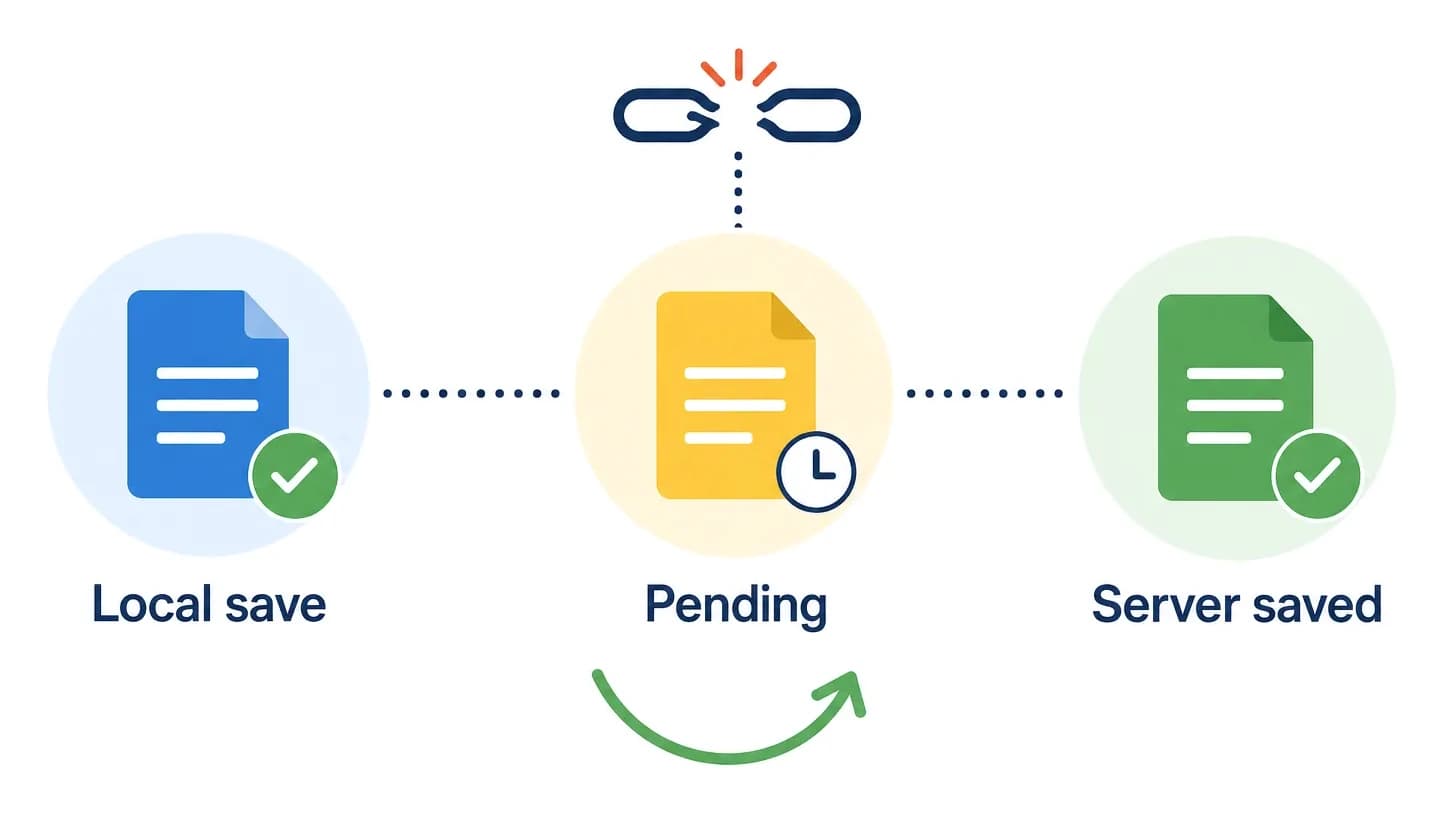
Ask what happens when someone closes the app before it uploads, taps submit twice, or edits a record somebody else changed in the meantime. A retry must never quietly create a second booking, order or report.
A good proposal describes pending, successful and failed saves. Where two people can change the same thing, it says whether the app prevents the clash, asks the user to choose or follows a written rule. You may not need full sync in the first release, but someone needs to have decided that on purpose.
Ask, too, how long unsent work can safely wait on the device. Browsers can clear stored data when a device runs low on space, and Safari can clear a site's data after a week without a visit unless it was added to the Home Screen. Drafts should reach the server as soon as there is a signal.
Browser support needs a written test list
"Works on mobile" is too vague to put in a contract. Ask which browsers and operating systems are covered, and whether testing includes the app installed as well as in an ordinary browser tab.
Install prompts, notification permissions and background behaviour differ between browsers. The Background Sync API, which lets an app finish an upload after the user has closed it, works in Chrome and Edge but not in Safari or Firefox at the time of writing. So a feature that works in a demo on one phone can behave differently for your customers.
Start from the browsers your users actually have. If you don't know yet, write that down as an assumption. Then ask the supplier to name what won't work and what happens instead. A clear limitation is worth more than a blanket promise of compatibility.
Check notifications and device access separately
If reminders are essential, ask for a demo of the notification flow on the phones you are targeting, including what happens when someone taps "Don't allow". The app still needs a sensible path for the people who say no.
The same goes for the camera, location, Bluetooth and anything else on the device. Support and restrictions vary, so "PWAs can do that" is not proof that your workflow will work. Where a feature is uncertain, pay for a short technical check before committing to the full build. Finding a browser limit early is far cheaper than finding it once the rest of the product depends on it.
Plan for security and updates
Offline access can leave business data sitting on a phone. Ask what is stored, what happens when someone signs out and whether sensitive information needs to be available offline at all.
Cached app files also need an update plan. Ask what happens when you release a new version while someone has the old one open: stale screens, changed data formats and any work they haven't sent yet. You don't need to pick the technical solution yourself. You do need the supplier to explain it in plain terms and turn the important behaviours into tests you can watch before you accept the release.
What should your brief to every supplier include?
Send every company the same short brief built around one workflow you can test. Quotes are only comparable when they describe the same outcome, and a feature list headed "modern PWA" gives each supplier room to price something different.
Name the user and the task.. Who opens the app and what they need to get done, from start to finish.
Describe the conditions.. The browsers and devices, how often the connection drops and whether devices are shared.
Draw the release boundary.. Separate what must work at launch from later ideas such as notifications or full offline editing.
Write checks you can watch.. Include a dropped connection, a retry, signing out and an app update where they apply.
Ask for delivery and ownership terms.. Scope, changes, testing, launch, account access and who is responsible after launch.
Ask each company to send back its assumptions and exclusions with the price. One quote may cover viewing records offline while another includes editing and sync. Both say "PWA development", but they are not the same offer.
Where you can, ask for a walkthrough of a similar app that is already live. If client confidentiality rules that out, ask how they can show the same behaviour without exposing anyone's data. Screenshots won't answer any of these questions.
Finally, ask who will write the code and who makes the technical decisions. Working directly with the developer and working through an agency's account team can both go well, as long as you know how a question or a change of plan reaches the person building the product.
Where does Scryptic fit?
We build and launch web apps and SaaS MVPs for UK founders, including non-technical founders who don't want to hire a development team. You work directly with our founder, a full-stack developer with five years of experience building for enterprise clients and startups.
That makes us worth a look for a focused first product. It doesn't mean complex offline sync, background processing or every device integration will fit a short sprint. Making a web app installable is a small job on a modern framework; letting people edit offline and sync later is a large one. Bring those requirements to the discovery call and we'll tell you honestly whether they fit before we agree the build.
There are two fixed-price packages. Each sprint ends with a week of changes based on your feedback, and both include a handover week after launch.
| Package | Fixed price | Sprint | After launch |
|---|---|---|---|
| MVP | £10,000 + VAT | 2 weeks: 1 of development, 1 of changes from your feedback | 1 week of bug fixes and support |
| Extended MVP | £20,000 + VAT | 3 weeks: 2 of development, 1 of changes from your feedback | 1 week of bug fixes and support |
We agree the scope and price before work starts. Every Friday we get on a video call to go through what shipped and what comes next, so you can reorder priorities early. New ideas still have to fit the agreed scope or replace something in it.
If you already have a prototype or a codebase, we review it during discovery and keep the parts worth keeping. That includes apps made with no-code and AI builders, which we either harden into production code or rebuild, bringing your users and data across. That's a migration project, not a one-click conversion.
The code lives in your repository, and the hosting, database, payment and other accounts are in your name, handed over at launch. If that sounds like the right fit, book a free 30 minute discovery call to talk through the idea, the scope, the tech stack and which package suits it.
Which route should you choose?
Choose the route that is strongest at the hardest part of your product. Price and portfolio come after that.
A specialist PWA company. If the product's value depends on demanding offline work or browser features. Ask to see that behaviour working on your users' devices.
Scryptic. If you need a scoped web app MVP, direct access to the developer and a fixed-price launch sprint. Check the PWA behaviour you need fits first.
An independent developer. If you want to work directly with one person and can check their skills, availability and handover plans.
Your existing supplier. If an audit shows the current app can take the changes sensibly. A rebuild should fix a real problem, not just replace code nobody likes.
An in-house team. If the business needs steady product engineering and can take on recruiting and managing developers.
Before you sign, ask your preferred supplier to walk you through the worst failure in your brief, such as a form submitted twice on a dropping connection. Their answer will tell you more than another page of technology logos.
Frequently asked questions
- Does a progressive web app work offline?
- Only as far as it was built to. Some PWAs cache their screens or the content you have already viewed; others let you add or edit data offline and sync it later. Write down exactly which tasks must work without a connection and test them before you accept the app.
- Can an existing website become a PWA?
- Sometimes. Making a site installable is usually a contained job, while handling data offline can mean substantial changes to the app. Get the existing code, sign-in and data flows reviewed before you accept a conversion quote.
- How much does PWA development cost?
- It depends on the workflow, any app you already have and the browser behaviour you need, and offline editing with sync costs far more than installability alone. Our MVP package is £10,000 plus VAT for a two week sprint and the Extended MVP is £20,000 plus VAT for three weeks, with any PWA features assessed within that agreed scope.
- What support should be agreed before launch?
- Agree who fixes bugs, who has deployment access, who handles browser changes and who does future development, and what falls outside the contract. Our packages include one week of bug fixes and support after launch; it is a handover week, not an ongoing maintenance plan.